US Passport Photo Dimensions: 2×2 Inches Explained
The US Department of State requires passport photos to be exactly 2 × 2 inches (51 × 51 mm). This square format is unusual — most countries use rectangular 35×45mm photos — but it has been the US standard for decades.
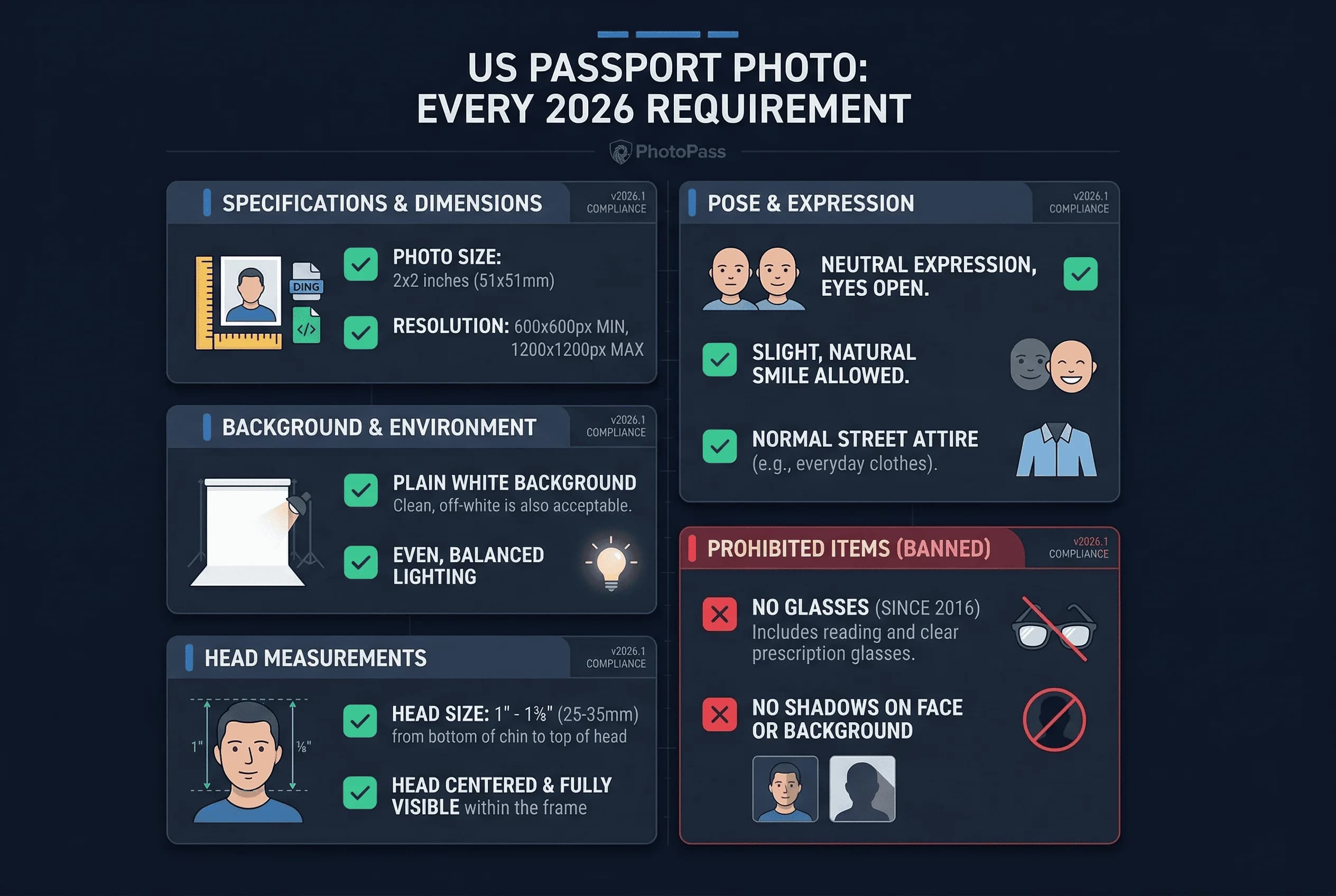
Your head, measured from the bottom of your chin to the top of your hair, must be between 1 inch and 1⅜ inches (25 mm to 35 mm) in the printed photo. That means your face should fill roughly 50 to 69 percent of the frame height. If your head is too small or too large in the frame, the photo will be rejected.
The eye line should sit at approximately 56 percent from the bottom of the image. Your head must be centered horizontally with equal space on both sides.
Get a compliant passport photo online
US Passport Photo Background and Lighting Requirements
The background must be plain white or off-white. No patterns, no shadows, no gradients. This is one of the most common rejection reasons — even a faint shadow cast on a white wall can trigger a failure.
If you are taking the photo at home, a clean white wall works well. Alternatively, hang a white bedsheet and iron out any creases, or use a large white poster board. Position yourself about two feet in front of the background to avoid casting shadows onto it.
Lighting tips
- Use soft, even lighting from the front or slightly to the side. Two lamps on either side of the camera at eye level produce the most even result.
- Avoid harsh overhead lighting, which casts shadows under the nose and chin.
- Avoid direct flash pointed at the face, which can wash out skin tones or create red-eye.
- Do not stand in front of a window — backlighting will silhouette your face and darken your features.
Natural daylight from a large window (with you facing the window, not standing in front of it) is the simplest way to achieve even lighting at home.
US Passport Photo Expression and Appearance Rules
The State Department requires a neutral facial expression or a slight natural smile with both eyes open and looking directly at the camera. Wide grins, squinting, and closed mouths with tension are not acceptable.
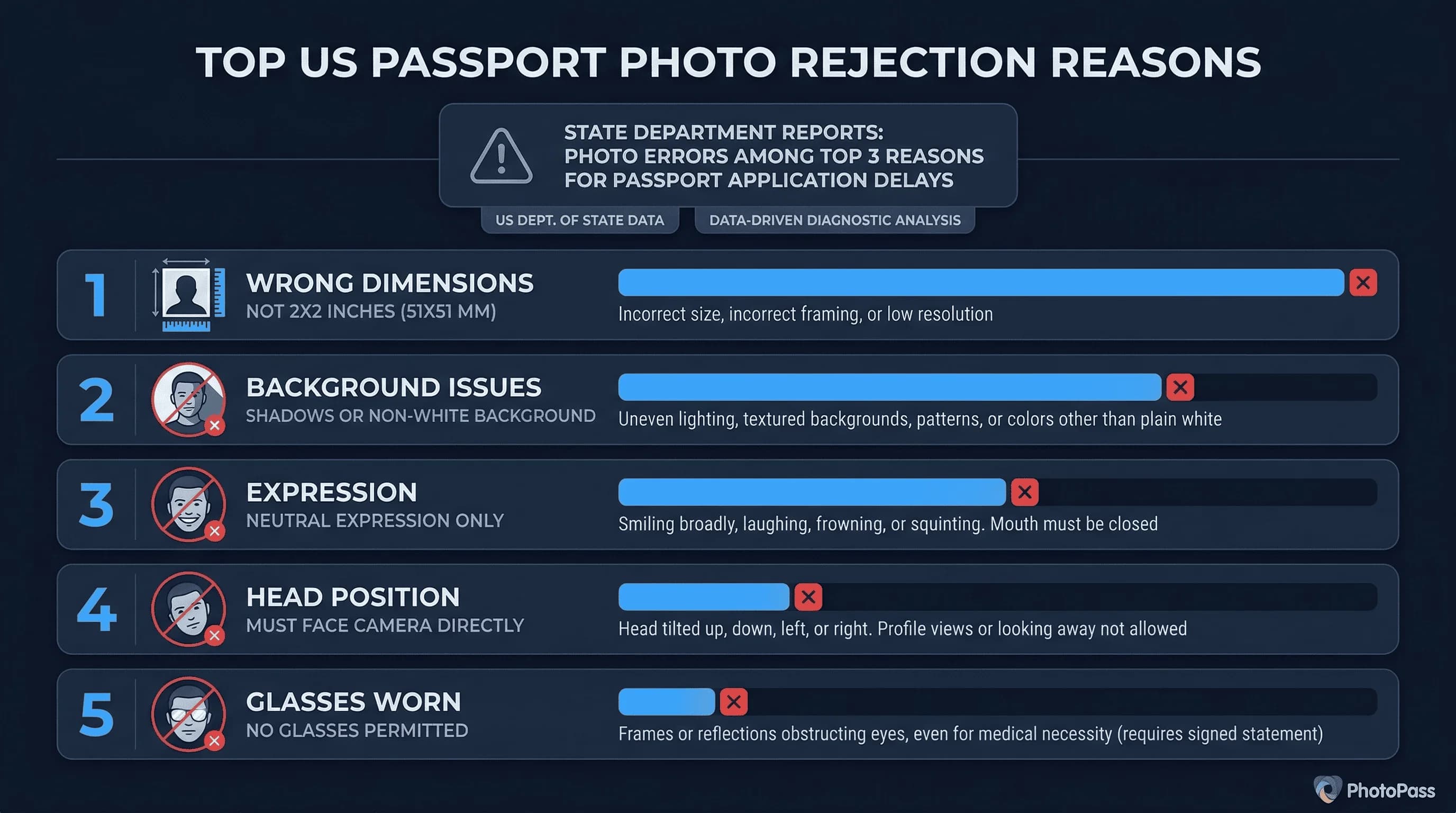
- Glasses: Not allowed since November 2016. This includes prescription glasses, sunglasses, and tinted lenses. A rare medical exception exists — if you cannot remove glasses due to a medical condition, you need a signed statement from your doctor. In practice, almost all applicants must remove eyewear. Prescription contact lenses are fine, but colored or decorative lenses are discouraged because they alter iris patterns used for biometric matching.
- Head coverings: Only permitted for documented religious or medical reasons. Even then, the full face must remain visible from the bottom of the chin to the top of the forehead, and both edges of the face must be clearly shown.
- Hair: Must not obscure your face. Both ears should be visible if possible. Hair that falls across the forehead or over the eyes will cause a rejection.
- Clothing: Wear normal everyday clothing. Do not wear uniforms, camouflage, or anything that could be mistaken for official attire. Head-to-shoulder framing means only your upper clothing is visible.
US Passport Photo Recency and Color Requirements
Your passport photo must have been taken within the last six months. If your appearance has changed significantly since the photo was taken — through weight change, surgery, facial hair, or aging — the photo may be rejected even if it is recent.
The photo must be in full color. Black-and-white photos are not accepted. The image should have realistic skin tones without filters, heavy editing, or artificial color adjustments.
US Passport Photo Digital Upload Requirements
If you are applying online or submitting a DS-160 visa application, you need a digital version of your photo:
- Format: JPEG
- Dimensions: 600 × 600 pixels minimum, 1200 × 1200 pixels maximum
- File size: Between 20KB and 240KB
- Color space: sRGB (24-bit color depth)
The State Department's online portal will reject files outside these ranges immediately on upload. If you are applying by mail using form DS-11 (new passport) or DS-82 (renewal), you submit a printed 2×2 inch photo instead — no digital file is needed for mail applications.
For printed photos, use photo-quality paper with either a matte or glossy finish. Standard printer paper is not acceptable. Most drugstore photo printers (CVS, Walgreens, Walmart) produce prints on suitable paper.
Where to Get Your US Passport Photo in 2026
Retail locations: CVS, Walgreens, Walmart, Costco, and USPS post offices all offer passport photo services. Typical cost is $12–$17 for two printed copies. The staff will frame, crop, and print the photo on the spot.
At home: You can take a compliant passport photo at home with a smartphone and a white background. This is faster and cheaper, but you need to verify the photo meets all requirements before submitting. Crop to 2×2 inches, verify head size positioning, and print on photo paper if needed.
Online tools: Upload a selfie to a passport photo compliance checker and the tool verifies dimensions, background, head positioning, and file size automatically. This catches errors before they cause delays.
Special Situations for US Passport Photos
Infants and babies: The same 2×2 inch format applies. The infant must have both eyes open and face the camera directly. No pacifiers, toys, or other people visible in the frame. Lay the baby on a white sheet or hold them in front of a white background. Head positioning rules are relaxed for infants — the face must be visible, but exact head-height percentages are interpreted more flexibly.
Young children: Children must look at the camera with both eyes open and mouth closed. A parent may need to hold the child, but the parent's hands and body must not appear in the frame.
Religious head coverings: Permitted with a signed statement explaining the religious requirement. The covering must not cast shadows on the face, and the full face from chin to forehead must remain visible.
Common Mistakes That Cause US Passport Photo Rejections
Background shadows: The most frequent rejection reason. Even a faint shadow behind your head reads as a non-white background. Stand at least two feet in front of the wall and ensure lighting comes from the front.
Wrong head size: If your face fills less than 50 percent or more than 69 percent of the frame vertically, the photo fails. This is the second most common rejection. Use a guide overlay or compliance tool to check before printing.
Glasses in the photo: Despite the rule being in place since 2016, people still submit photos wearing glasses. Even clear-frame glasses with no tinting are rejected.
Overexposure or underexposure: A photo that is too bright washes out facial features. Too dark and the system cannot match biometric data points. Aim for natural, even lighting with realistic skin tones.
Incorrect expression: Exaggerated smiles, closed eyes, or tension in the face trigger rejections. A neutral expression or a slight natural smile is the safest choice.
Blurry or low-resolution image: For digital submissions, images under 600×600 pixels are rejected outright. Even if dimensions are correct, a blurry image from camera shake or aggressive compression will fail manual review.
Getting your passport photo right on the first try saves time and avoids delays. The passportsize-photo.online compliance checker validates all these requirements automatically before you submit.