Most online passport applications limit photo uploads to between 240KB and 500KB. The US DS-160 visa form caps files at 240KB. India's passport portal allows up to 300KB. UK and Canada are less strict, accepting whatever their systems can handle. Getting the file size right matters — too large and your upload fails, too small and quality suffers.
Passport Photo File Size Limits by Country
Different governments set different limits. Here's what actually happens at each portal:
| Country/Portal | Maximum File Size | Minimum File Size | Format |
|---|---|---|---|
| US DS-160 (visa) | 240KB | 20KB | JPEG |
| US Passport Renewal Online | 500KB | 20KB | JPEG |
| India Passport | 300KB | 10KB | JPEG |
| India PAN Card | 200KB | 10KB | JPEG |
| UK Passport | 500KB | 50KB | JPEG |
| Canada Passport | 472KB (approx) | 20KB | JPEG |
| Germany | 500KB | 20KB | JPEG |
| Australia | 500KB | 20KB | JPEG |
The US DS-160 stands out as the strictest. That 240KB limit catches many applicants off guard — a decent photo from your phone easily exceeds it. The US passport photo specifications require this small file size to ensure quick uploads and consistent processing across all application centers. India's 300KB limit is also tight, especially compared to what most people shoot with modern devices.
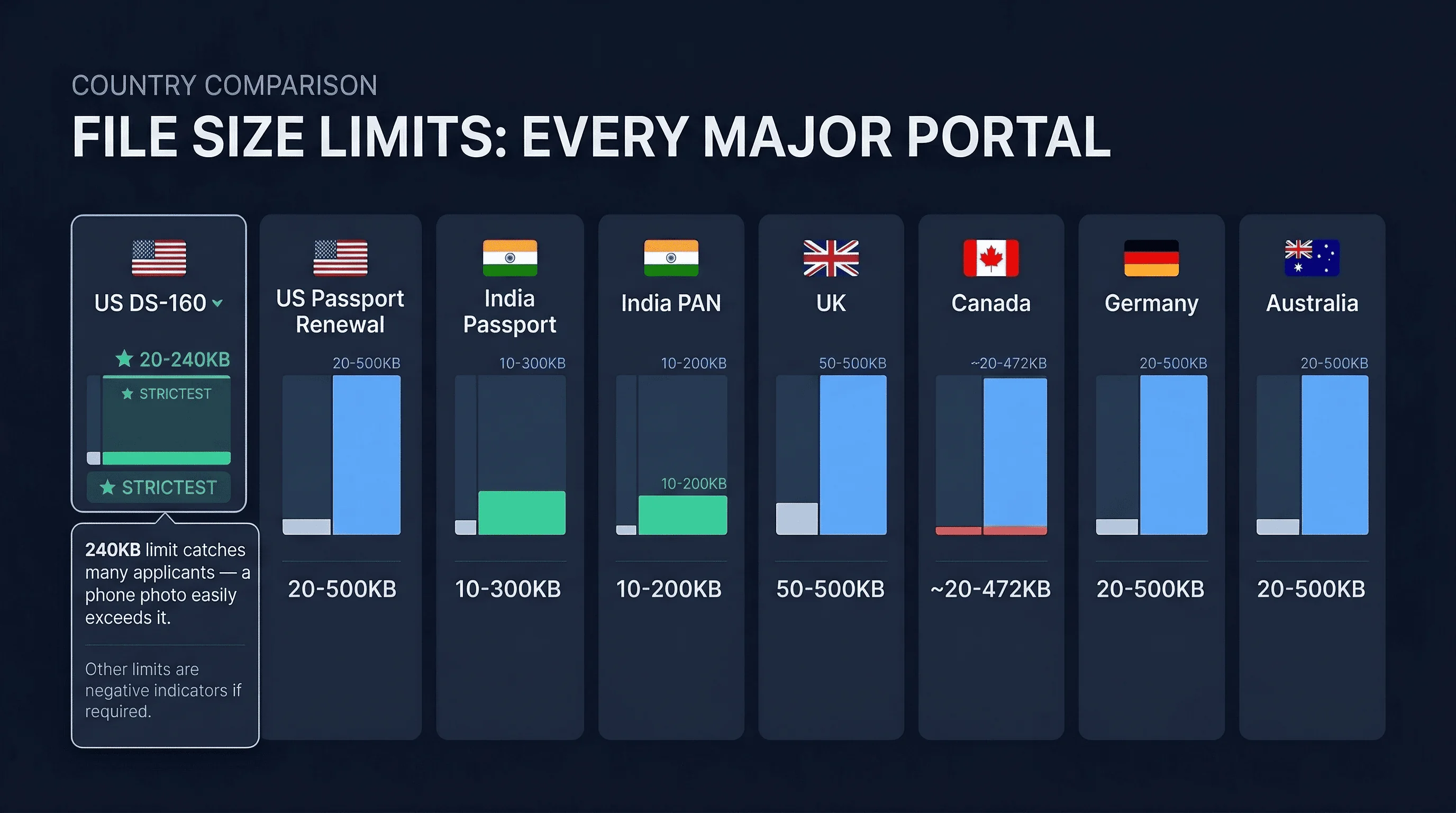
Germany, the UK, and Australia are more generous, allowing up to 500KB. But even that can be tricky if you're uploading a full-resolution image from a modern smartphone. The difference between 240KB and 500KB might not sound like much, but it determines whether your photo uploads successfully or bounces back with an error message.
Get a compliant passport photo online
How to Reduce Passport Photo File Size Without Losing Quality
If your photo exceeds the limit, you have several options. The goal is shrinking the file while keeping facial details sharp enough for recognition systems.
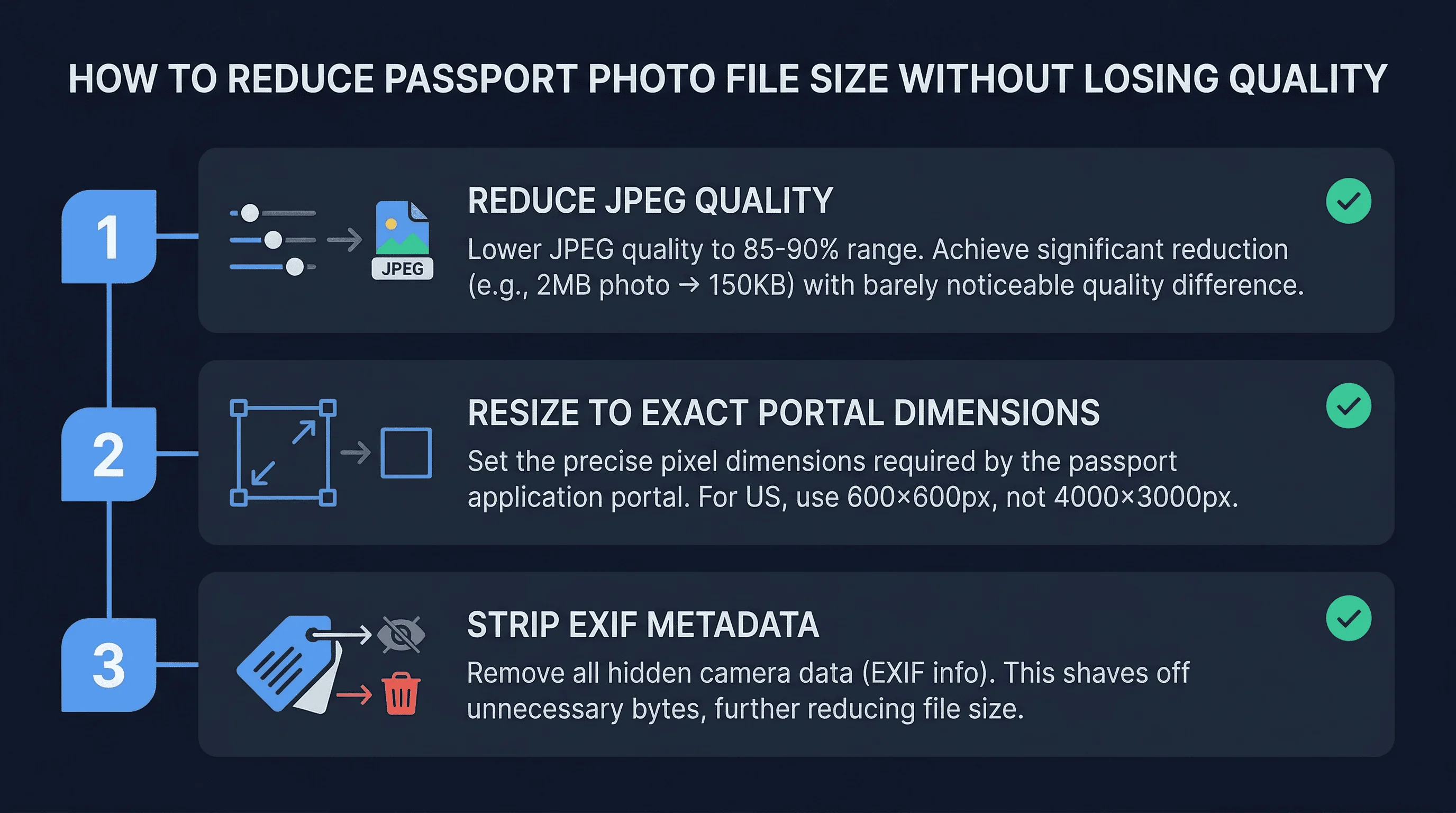
Reduce JPEG quality. This is the most effective method. Export your photo at 85-90% quality instead of 100%. You'll barely notice the difference visually, but the file size drops dramatically. A 2MB photo at maximum quality might become 150KB at 85%. Most portals accept this trade-off without issue.
Resize to exact dimensions. Your phone shoots at 4000×3000 pixels or more. Most passport portals need 600×600 pixels (for US 2×2 inch) or smaller. Resize to exactly what the portal requires rather than uploading a massive image. Smaller dimensions mean fewer pixels, which means smaller file size.
Remove unnecessary metadata. Photos carry GPS location, camera model, date, and other information that nobody needs for a passport application. Stripping this metadata saves a few kilobytes. Most online compressors do this automatically.
Use an online compressor. Tools like TinyPNG, CompressJPEG, or ImageOptim reduce file sizes intelligently. They analyze the image and apply compression where it's least noticeable. For passport photos, these tools typically achieve 60-80% size reduction with no visible quality loss.
The best approach combines all three: resize to the exact pixel dimensions needed, export at 85% JPEG quality, then run through a compressor if still over the limit.
How to Check Your Passport Photo File Size Before Uploading
It's simple to check before you upload.
On Windows, right-click your image file and select Properties. Look at the Size field — that's your file size in kilobytes.
On Mac, right-click (or Control-click) the file and select Get Info. The file size appears near the top of the information window.
In your file manager (Windows Explorer, macOS Finder), you can often see the file size in the details view. Enable the Size column if it's not visible.
Most image editing software also displays file size when you save or export. Photoshop shows it in the Save for Web dialog. Preview shows it in the Export menu.
Common Passport Photo File Size Errors and How to Fix Them
The phone photo problem. Modern smartphones capture photos ranging from 3MB to 15MB. This is dozens of times larger than what passport portals accept. Even after resizing to the correct dimensions, the file size remains high because JPEG compression at high quality produces larger files. The solution: resize AND reduce quality together.
The error message confusion. When uploads fail, error messages often say "file too large" without specifying the exact limit. Applicants guess wildly, compress too much, and end up with photos that are too small. Knowing the specific limits prevents this trial and error.
Batch application issues. If you're applying for family visas or multiple passports, each photo needs to meet the limits independently. A single photo that works for one application might fail for another if the requirements differ. Check each country's portal separately.
The conversion trap. Converting HEIC to JPEG sometimes produces larger files than expected, especially on Mac where Preview defaults to high-quality export. Always check file size after conversion and adjust quality settings as needed.
Why Do Passport Photo Portals Have File Size Limits?
Government portals impose file size limits for practical reasons. Large files slow down processing systems, especially when thousands of applications stream through daily. Smaller files load faster on slower internet connections common in rural areas. Storage costs accumulate when dealing with millions of applications.
These limits also serve a quality control function. Extremely small files (under 20KB) almost always look terrible. By setting minimums alongside maximums, portals filter out obviously unusable photos before they reach review officers.
Passport Photo Compression Guide: Settings by Portal
Here's a practical cheat sheet for hitting each portal's limit on the first try:
DS-160 (US visa, 240KB max)
- Resize to exactly 600×600 pixels
- Export JPEG at 80% quality
- Typical result: 80–150KB
US online passport renewal (500KB max)
- Resize to 600×600 pixels
- Export JPEG at 90% quality
- Typical result: 120–250KB
India passport portal (300KB max)
- Resize to 413×413 pixels (India's 35×35mm square at 300 DPI)
- Export JPEG at 85% quality
- Typical result: 60–120KB
UK passport service (500KB max)
- Resize to 413×531 pixels
- Export JPEG at 90–95% quality
- Typical result: 100–300KB
These are starting points. Check the actual file size after exporting and adjust quality up or down by 5% if needed. If you're still over the limit after reducing quality to 75%, the issue is likely that you haven't resized the pixel dimensions — a full-resolution phone photo compressed to 75% is still much larger than a properly resized 600×600 image at 90%.
What If Your Passport Photo File Is Too Small?
This happens less often, but over-compression creates problems too. Files under 50KB usually show visible quality loss — blocky artifacts, color banding, or fuzzy edges that might raise questions during review.
If your file is too small, re-export at higher quality. Go back to your original image and save at 90-95% quality instead of 85%. The file size increases, but so does image quality.
The sweet spot sits between 80KB and 200KB for most portals. Large enough to look professional, small enough to upload without errors.
Before uploading, verify your photo meets all requirements — not just file size, but also dimensions, DPI, and composition. Use the passportsize-photo.online passport photo checker to confirm your photo is ready. Check the full requirements for your target country, and learn more about converting iPhone photos if you're having format issues.