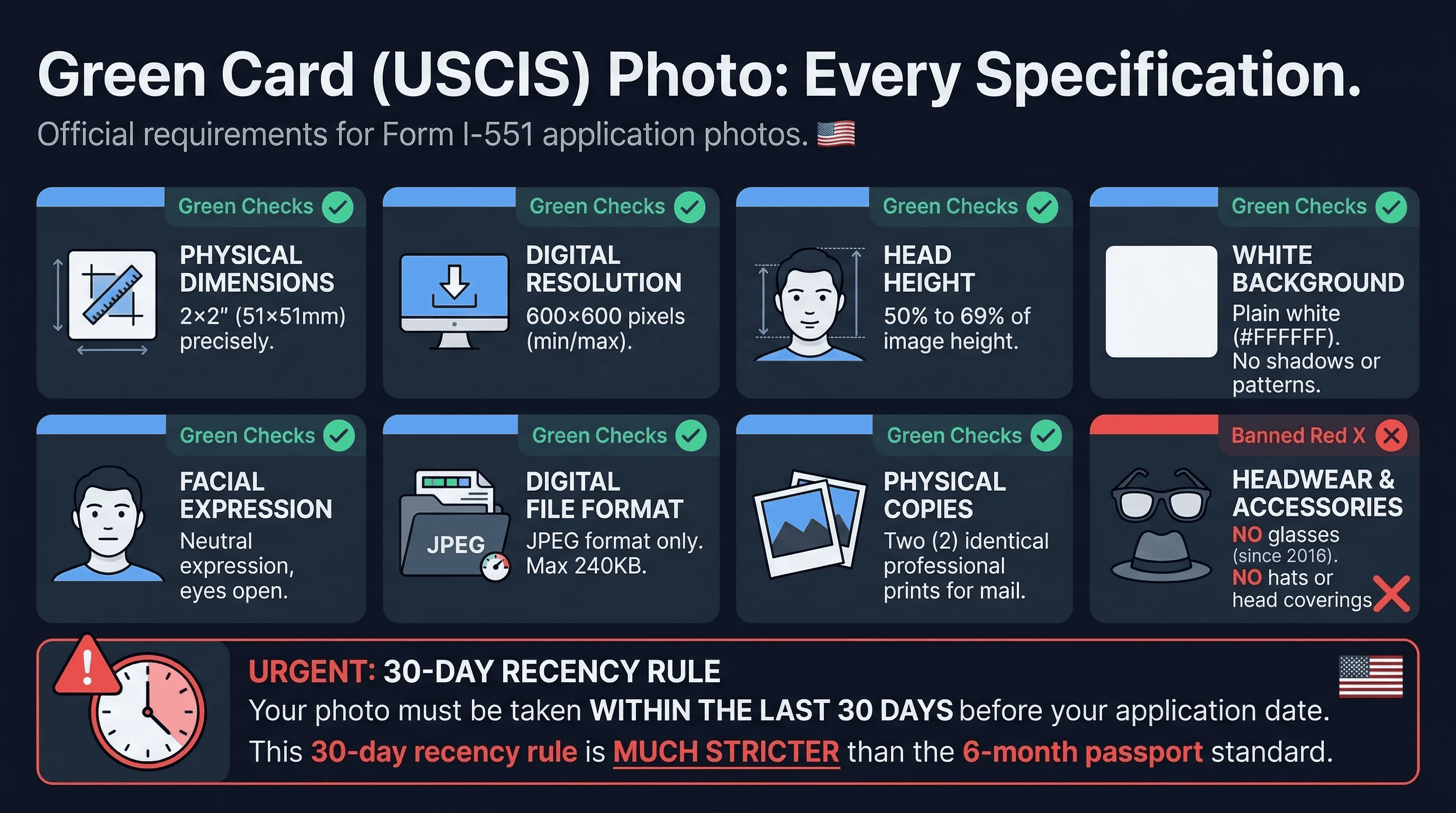
Your green card photo must be exactly 2×2 inches (51×51mm) with a digital resolution of 600×600 pixels. The background must be plain white. Your head must fill 50-69% of the photo's vertical space, measured from the bottom of the chin to the top of the head. These aren't suggestions — they're the hard requirements that determine whether your application moves forward or gets rejected.
USCIS processes over 140,000 adjustment of status applications annually. Photo-related rejections are surprisingly common, yet entirely preventable. Whether you're adjusting status from within the US or going through consular processing, understanding US passport photo requirements helps put green card specifics in context.
The Three Green Card Forms: Same Photo, Different Contexts
Whether you're filing Form I-485 (adjustment of status), Form I-90 (renewal), or Form I-751 (removal of conditions), the photo requirements are identical. One set of photos works for all three.
The confusion arises because each form serves a different purpose. I-485 is for people already in the US who are upgrading from a temporary visa to permanent resident status. I-90 is for current green card holders renewing an expiring or soon-to-expire card. I-751 is for conditional permanent residents removing the two-year condition on their residency.
Despite the different purposes, USCIS mandates the same photo specifications across all three forms. This wasn't always the case — prior to 2016, there were minor variations. The standardization eliminated one potential source of applicant confusion.
Get a compliant passport photo online
Key Differences Between Green Card and Other US Photos
Green card photos share specifications with US visa photos and passport photos, but subtle differences exist. The US passport photo requires the same 2×2 inch format and 600×600 pixel dimensions, but green card applications have additional rules about photo recency and submission format.
DS-160 visa photos use identical dimensions but must be uploaded through the State Department's specific portal. The green card process, administered by USCIS rather than the State Department, follows different procedural rules despite similar visual requirements.
Understanding these overlaps helps when you're gathering photos for multiple applications. A single photo session can yield images suitable for various documents if specifications are understood correctly.
What USCIS Actually Requires for Green Card Photos
Your green card photo must meet these precise specifications:
Physical dimensions: 2×2 inches (51×51mm) Digital dimensions: 600×600 pixels Background: Plain white (#FFFFFF or equivalent) Head size: 50-69% of image height File format: JPEG for online, physical prints for mail File size: Maximum 240KB for online upload Photo age: Taken within last 30 days
Two identical prints are required for most applications. Online filers upload the digital version directly through the USCIS ELIS portal. Mail-in applicants include the physical prints with their forms.
The No-Glasses Rule: Recent Changes
Since November 2016, glasses are prohibited in all USCIS photos — including green card photos. This change caught many applicants off guard. Prior to the rule change, glasses were permitted if they didn't obscure the eyes.
If you wear glasses permanently for vision correction, you must remove them for your green card photo. This means wearing contact lenses instead, if possible. Religious accommodations exist, but they require additional documentation and significantly slow processing.
The rule exists because glasses cause reflections, shadows, and glare that interfere with facial recognition software. USCIS uses automated biometric matching to verify applicant identity against their photo.
Common Green Card Photo Rejection Reasons at USCIS
USCIS rejects green card photos for several recurring issues:
Wrong dimensions. The 2×2 requirement is non-negotiable. Photos that are even slightly off — 1.98×1.98 inches, for example — get rejected. Many commercial photo services default to passport-size prints, which can vary slightly.
Incorrect head size. The 50-69% rule trips up many applicants. Professional photographers understand this requirement, but drugstore booth photos often produce head sizes outside the acceptable range.
Non-white background. Off-white, light gray, or patterned backgrounds cause rejections. Even a subtle cream tone fails the compliance test. The background must be pure white.
Old photos. Photos older than 30 days get rejected. The "taken within last 6 months" rule from other applications doesn't apply here. USCIS is strict about recency.
Expression issues. Neutral expression required. No smiling (teeth visible), no frowns, no raised eyebrows. Both eyes must be open and visible.
Green Card Processing Timeline After Photo Submission
After you submit your green card application with compliant photos, expect the following timeline:
- Receipt notice: 2-3 weeks
- Biometric appointment: 4-8 weeks (they'll take another photo at this appointment)
- EAD/AP combo card (if requested): 3-6 months
- Green card approval: 8-14 months (varies significantly by service center)
The photo you submit with your initial application gets stored in USCIS systems. At your biometric appointment, they'll verify that the photo still resembles you. Significant weight changes, hairstyle changes, or facial hair between application and interview can cause complications.
Where to Get Compliant Green Card Photos
Professional passport photo services understand green card requirements. CVS, Walgreens, and Wal-Mart passport photo services typically produce compliant images. However, always verify the dimensions yourself before submitting.
For US-based applicants, most cities have dedicated passport photo studios that specialize in government-compliant photos. These services typically charge $15-25 for two prints and guarantee their work meets official specifications.
The USCIS photo requirements page provides official guidance. Cross-reference any photo service's output against these requirements.
For digital submissions, use a tool like our passport photo checker to verify your photo meets all specifications before uploading. Catching issues early prevents application delays.
Understanding the Digital Upload Process
If you're applying from within the United States, you'll likely use the USCIS Online Filing system. Creating an account at uscis.gov is the first step. Go to the appropriate form (I-485, I-90, or I-751), complete all required fields, and reach the document upload section.
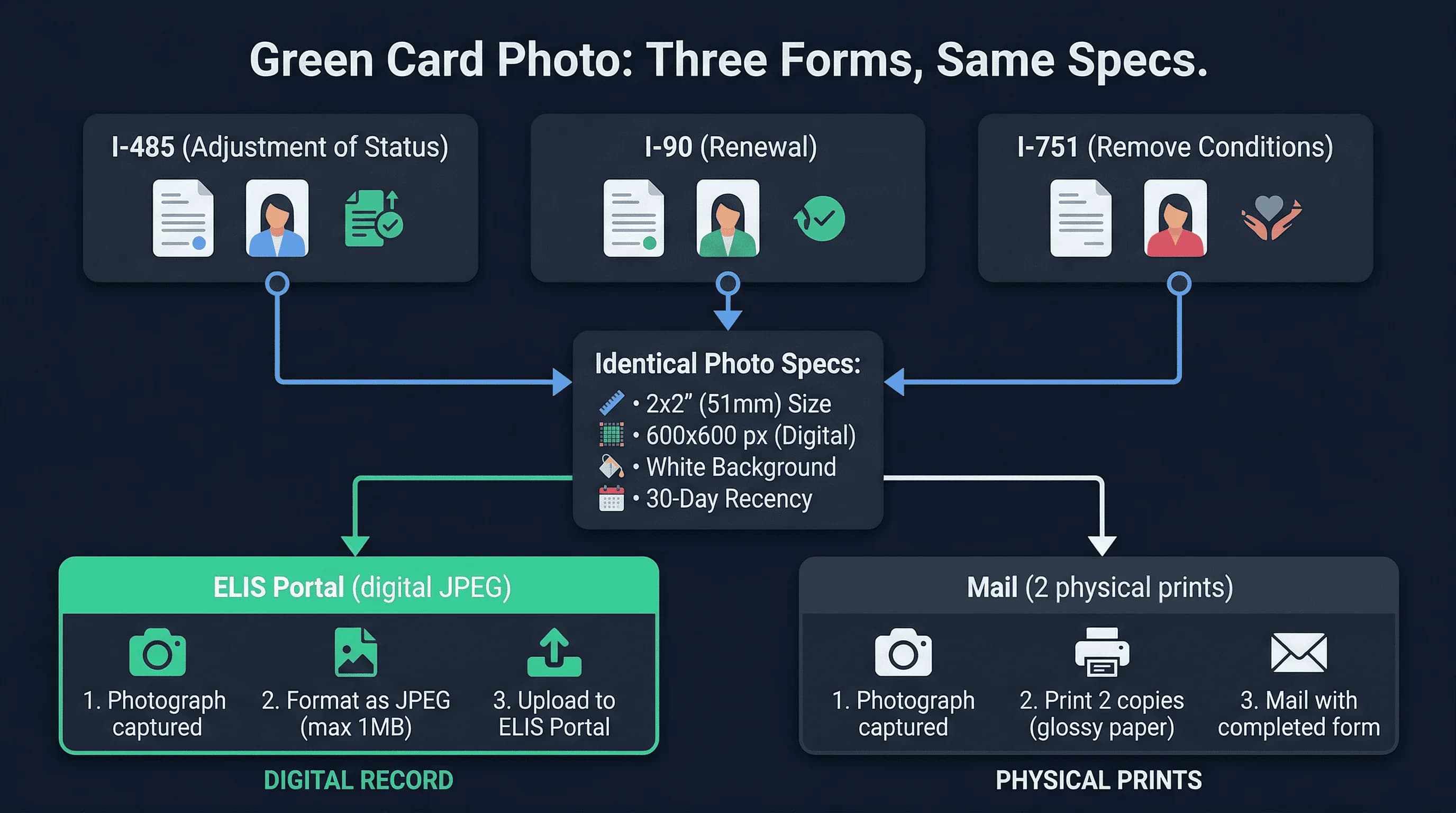
The photo upload tool accepts only JPEG files between 20KB and 240KB. The system performs automated validation — if your photo fails, you'll receive an error message immediately. Common failure points include file size exceeding limits, incorrect aspect ratio, or insufficient image resolution.
After successful upload, the system displays your photo as part of the application summary. Review it carefully before submitting. Once submitted, changing your photo requires contacting USCIS and potentially delaying processing.
International Applicants: Different Rules
Green card applicants residing outside the United States follow a different path. The National Visa Center (NVC) handles consular processing, and photo requirements differ slightly.
For consular processing, you'll need physical photos mailed to the NVC along with your forms. The specifications remain identical, but the submission process is entirely paper-based. Many international applicants use local photo services that may not understand US requirements — this is a frequent source of delays.
If you're applying from abroad, consider using a US-based digital photo service that can email you compliant files. You can then print locally or bring the digital files to a local printer. The key is ensuring the specifications match exactly.
Why Background Color Matters So Much
The plain white background requirement exists for biometric security reasons. Automated facial recognition systems compare your photo against databases using facial landmarks. Non-white backgrounds introduce variables that complicate this matching process.
Pure white (#FFFFFF) is the standard. Light gray backgrounds common in professional photography won't pass. Neither will backgrounds with any pattern, texture, or color cast. Even the white walls in many homes aren't truly white enough — they tend toward cream or off-white.
If taking your own photo, use a dedicated white backdrop or white sheet. Ensure proper lighting to avoid shadows. The difference between a compliant white background and a non-compliant off-white one may be invisible to the naked eye but immediately apparent to automated systems.
Common Green Card Photo Questions Answered
Can I wear makeup? Yes, but keep it minimal. Heavy makeup that significantly alters your appearance can cause issues at the biometric appointment. The goal is to look like yourself.
What about headscarves or religious attire? Religious head coverings are permitted for sincerely held beliefs. However, the face must be fully visible — no veils or coverings that obscure any facial features. A statement explaining the religious requirement may be necessary.
What if I've had plastic surgery? Significant facial changes since your photo was taken can complicate verification. Include documentation of any surgeries if possible. The biometric system compares current appearance against your submitted photo — substantial differences trigger manual review.
Can I smile? A neutral expression or a natural, relaxed smile are both accepted. What is not accepted: exaggerated grins, squinting, frowning, raised eyebrows, or any expression that significantly distorts your facial features. The standard exists to ensure consistent facial landmark mapping across biometric systems.
Does beard or hair style matter? Significant changes between your photo and your biometric appointment can cause delays. If you grow a full beard or drastically change your hairstyle, bring documentation showing your appearance at the time of the photo. USCIS officers verify identity manually when discrepancies exist.
What about retouching or filters? Digital alterations are strictly prohibited. Photos must be unretouched, unedited images. Even subtle smoothing or color adjustments violate the rules. The photo must represent your true appearance.
Can I use a photo from my passport? Possibly, but with caveats. If your passport photo meets all green card specifications and was taken within the last 30 days, it may work. However, passport photos are typically taken further in advance than green card applications allow.
Final Green Card Photo Checklist Before Submission
Review these points before submitting your green card application:
- Photo is exactly 2×2 inches (51×51mm)
- Digital version is 600×600 pixels
- Background is pure white with no shadows or patterns
- Head occupies 50-69% of vertical space
- No glasses are worn
- Expression is neutral with mouth closed
- Both eyes are open and clearly visible
- Photo taken within last 30 days
- Two identical prints available (if mailing)
- JPEG file is under 240KB (if uploading)
Going through this checklist prevents the frustration of RFE (Request for Evidence) notices that extend processing times by months. A moment of attention now saves months of waiting later.
Recent Changes to USCIS Green Card Photo Rules
USCIS updated their photo guidance in early 2025 to clarify digital submission requirements. The 240KB maximum file size is strictly enforced — photos that exceed this limit won't upload through the ELIS portal. Compression artifacts from aggressive file size reduction can also cause rejection.
Additionally, selfies are explicitly prohibited. The photo must be taken by another person or by a professional photo service. Mirror selfies, even with perfect dimensions, get rejected.
Your green card photo seems like a small detail. It's not. One non-compliant photo can add months to an already lengthy process. Get it right the first time.
Related Articles
- DS-160 Photo Requirements — Related requirements for visa applications
- US Visa Photo vs Passport Photo — Understanding the differences