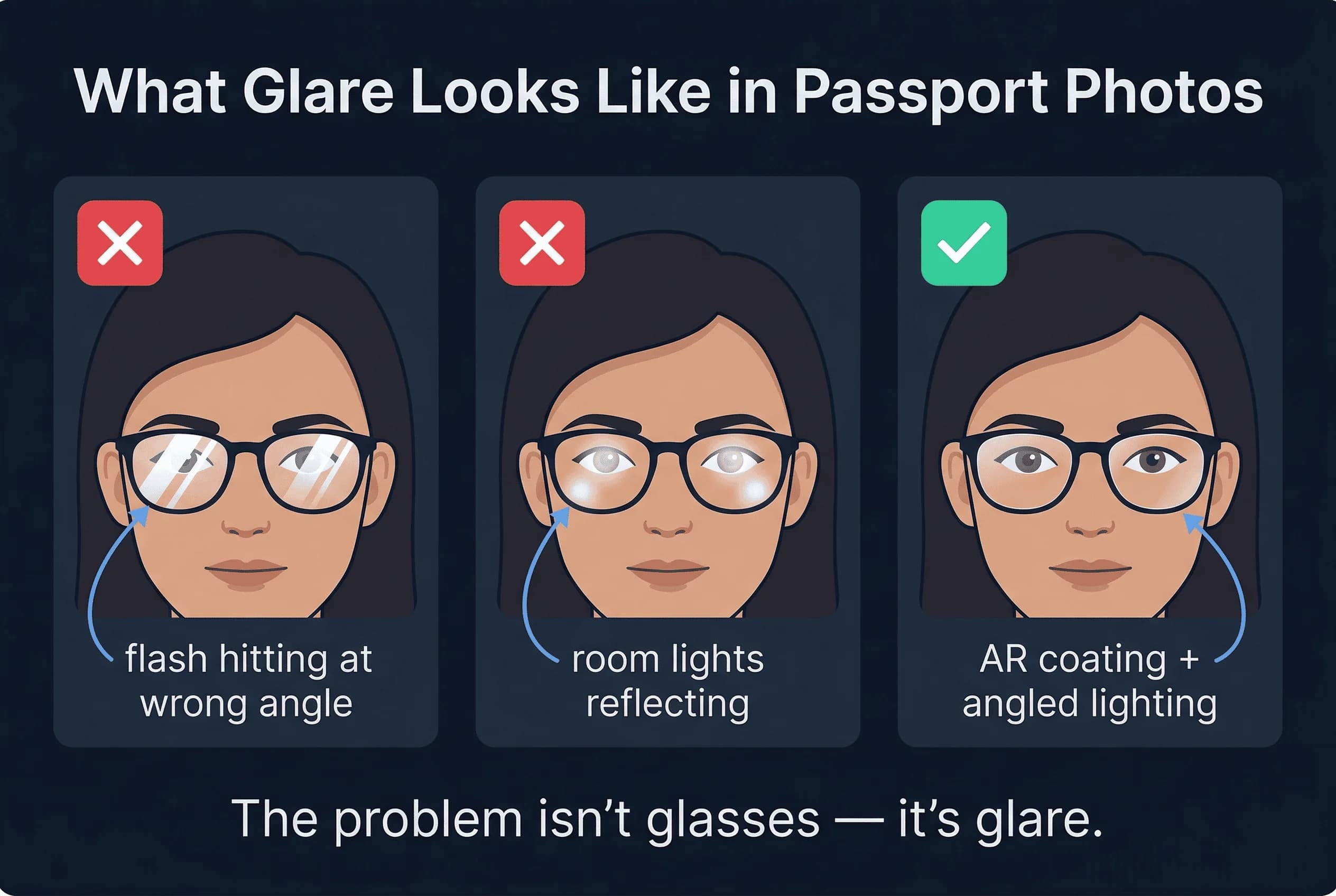
Glasses are one of the most common issues in passport photos. The problem isn't the glasses themselves—it's the glare and reflections that obscure your eyes. Many countries have strict rules about this.
Here's what you need to know about glasses in passport photos, including the rule that surprises most people.
The US Rule: No Glasses Since 2016
This surprises many people: you cannot wear glasses in US passport photos. The US State Department banned glasses in November 2016. This applies to all passport applications submitted after that date.
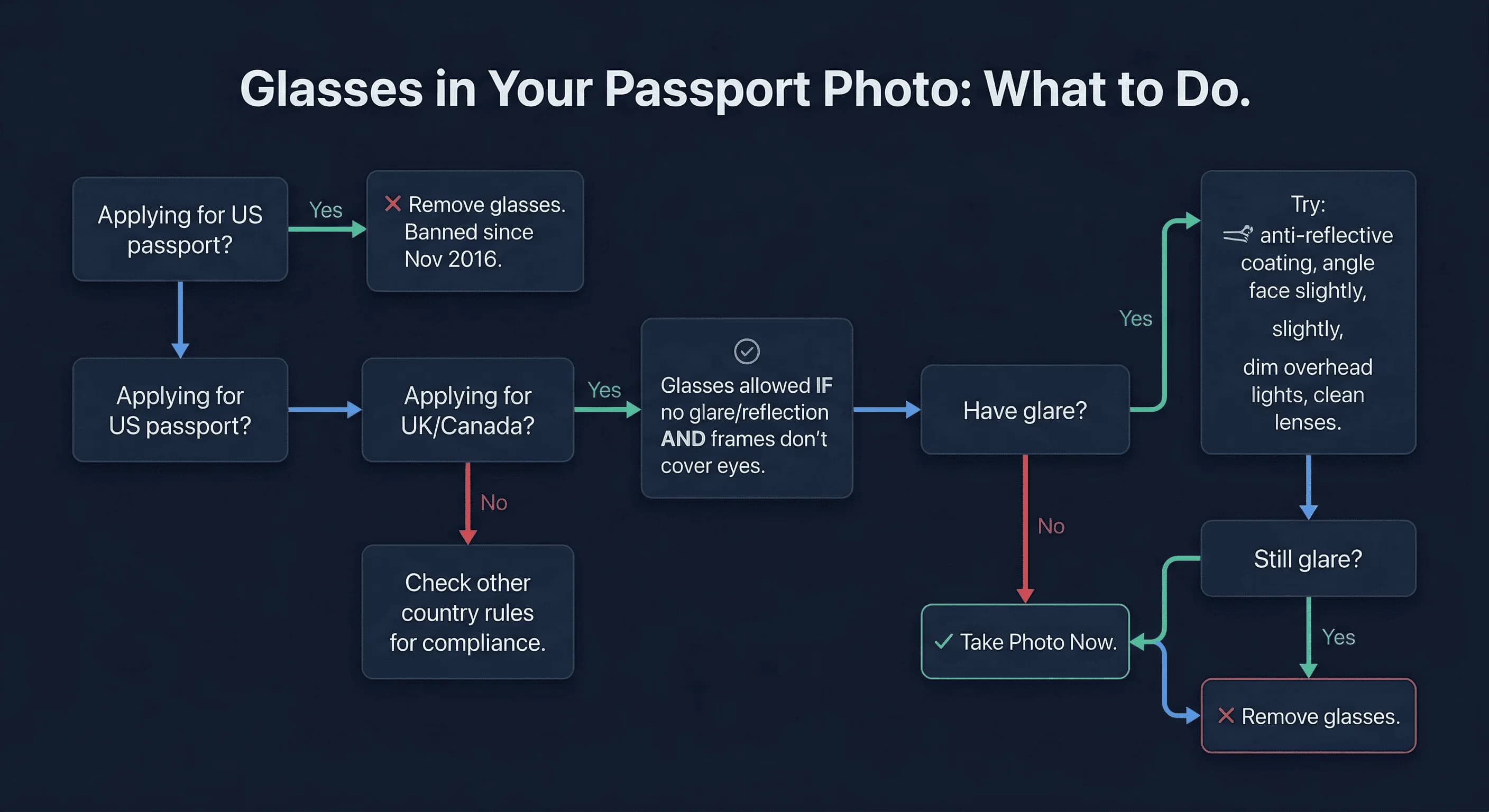
The rule exists because glasses create reflections that can obscure your eyes. Even with anti-reflective coating, the lens surface catches light and creates visible glare in photos.
If you're applying for a US passport: Take your glasses off. There's no exception for prescription glasses, tinted glasses, or any other type. The only exceptions are for medical reasons (with documentation from a doctor).
Get a compliant passport photo online
Countries That Still Allow Glasses in Passport Photos
Many countries still permit glasses, but with strict conditions:
- United Kingdom — Glasses allowed, but no glare or reflection. Frames must not cover your eyes.
- Canada — Glasses allowed if no glare is visible.
- Germany — Glasses allowed if eyes are clearly visible, no tint.
- South Korea, Italy, Switzerland, Poland, Russia — Glasses allowed with no glare.
Some countries that people assume allow glasses actually ban them outright:
- Australia — Glasses are not permitted in passport photos.
- France — Glasses are not permitted in passport photos.
- Japan, India, Singapore — Glasses are not permitted.
Check your destination country's specific requirements. Rules change, and some countries are stricter than others.
How to Avoid Glare If Your Country Allows Glasses
If your country allows glasses, here's how to prevent glare:
1. Tilt Your Glasses Slightly Down
Ask the photographer to tilt your glasses slightly downward (about 15 degrees). This angles the lenses away from direct camera reflection and reduces glare significantly.
2. Use Anti-Reflective Coating
If you have a choice in frames, choose lenses with anti-reflective coating. This coating is designed to minimize reflections and works better in photos.
3. Clean Your Lenses Before the Photo
Dirty lenses scatter light and create more glare. Clean your glasses thoroughly before the photo.
4. Position Lighting Carefully
The key to glare-free glasses is controlling where light reflects. Use these lighting setups:
- Diffused light from both sides — Two soft lights at 45 degrees reduce direct reflection
- Avoid direct flash — Flash is the worst for glasses glare
- Higher camera position — Shooting from slightly above eye level reduces reflection of overhead lights
5. Remove Your Glasses (Easier Solution)
If your country allows it, the simplest solution is to just take your glasses off for the photo. If you can see well enough to stand at the camera position without them, remove them. No glare, no problem.
What NOT to Do with Glasses in Passport Photos
Do NOT Photoshop Out Glare
This is critical. Photo editing is NOT allowed for passport photos. You cannot use Photoshop, Snapseed, or any other tool to remove glasses glare digitally.
From the US State Department: "Digital adjustments are not acceptable. The photo must be a original, unaltered photograph."
This applies to every country. Even if you successfully remove glare in Photoshop, your application can be rejected for using a modified photo.
Do NOT Use Polarized Lenses
Polarized sunglasses create unpredictable dark spots in photos. Never wear polarized lenses in a passport photo.
Do NOT Wear Tinted Glasses
Unless your country specifically allows tinted glasses, avoid them. Tinted lenses alter your eye visibility, which many countries reject.
The Global Picture: 74% of Countries Ban Glasses
If you wear glasses, the trend is not in your favour. Of the 31 countries in our compliance database, 23 (74%) now ban glasses outright in passport photos. Only 8 countries still allow them: the United Kingdom, Canada, Germany, South Korea, Italy, Switzerland, Poland, and Russia.
The shift has accelerated since the US glasses ban in 2016. As more countries adopt automated facial recognition at borders, glasses cause problems — reflections, distortion, and shadows all reduce the accuracy of biometric matching systems. Countries that still allow glasses require no glare and fully visible eyes, making compliant glasses photos challenging even where they're permitted.
The practical takeaway: if you can take your passport photo without glasses, do it. Even in countries that allow glasses, the risk of glare-related rejection is real. The safest approach is always to remove them.
Why Ring Lights Are Bad for Glasses in Passport Photos
If you wear glasses, avoid ring lights. The circular LED creates a circular reflection in your glasses that's nearly impossible to avoid. Standard softbox lights or window light work better.
Medical Exceptions for Glasses in Passport Photos
In countries that ban glasses, a medical exception may exist but it's narrow. For the US, you need a signed letter from a doctor explaining why you cannot remove your glasses — this applies in cases of severe photophobia or post-surgical conditions where removal would cause harm. Even then, approval is not guaranteed.
In the UK and Canada, where glasses are allowed by default, no medical exception is needed. Just ensure there's no glare.
For other countries, contact the passport office directly if you have a medical reason for wearing glasses. Don't assume an exception exists — verify it before submitting your application.
The practical advice: If you're getting a passport photo and you can physically remove your glasses for 30 seconds without harm, do it. The exception process is slow, uncertain, and adds weeks to your application. Taking the photo without glasses and putting them back on afterward takes seconds.
If You're Applying for a US Passport
Just take off your glasses. The rule is absolute, and fighting it isn't worth the rejection and delay. If you can't see well enough without them to look at the camera, have someone position you. You don't need to see the camera sharply — just face it directly. The photo itself must show your bare eyes.
Glasses Rules by Country: Summary Table
| Country | Glasses Allowed? | Notes |
|---|---|---|
| United States | No | Banned since November 2016 |
| United Kingdom | Yes | No glare, eyes must be clear |
| Canada | Yes | No visible reflection |
| Germany | Yes | No tinted lenses |
| South Korea | Yes | Eyes must be visible |
| Italy | Yes | No glare |
| Australia | No | Banned outright |
| France | No | Banned outright |
| Japan | No | Banned outright |
| India | No | Banned outright |
How to Verify Your Glasses-Free Passport Photo
If you're unsure about your country's rules, or if you've taken a photo with glasses, upload it to passportsize-photo.online's free passport photo checker. It detects glare and verifies against your destination country's specific requirements.
For US passport applications, the answer is simple: take off your glasses. For other countries, glare-free glasses photos are possible with the right lighting and positioning—but the easiest path is often just removing them. Once you've got your photo, check the general passport photo requirements to make sure everything else is correct before submitting.