
PhilSys ID Photo: What to Expect at Registration
You don't submit a photo for the PhilSys ID (PhilID). The Philippine Statistics Authority (PSA) captures your photo — along with your fingerprints and iris — during an in-person biometric registration appointment. You cannot prepare, control, or bring a photo to this process. What you can do is show up looking the way you want to appear on your official lifetime ID.
This is a one-time registration. Get it right.
What Is the PhilSys ID (PhilID) and Who Can Register?
The Philippine Identification System (PhilSys) is the Philippine government's national ID program, established under Republic Act 11055. The PhilID is the physical card issued to every registered Filipino citizen and resident alien. It contains the holder's 13-digit PhilSys Number (PSN), which serves as a universal government identifier.
Validity: Lifetime. The PhilID does not expire.
Who can register: All Filipino citizens (anywhere in the world) and resident aliens (with at least 6 months' residence in the Philippines). Registration is free.
First issuance: Free. Replacement cards carry a fee.
Get a compliant passport photo online
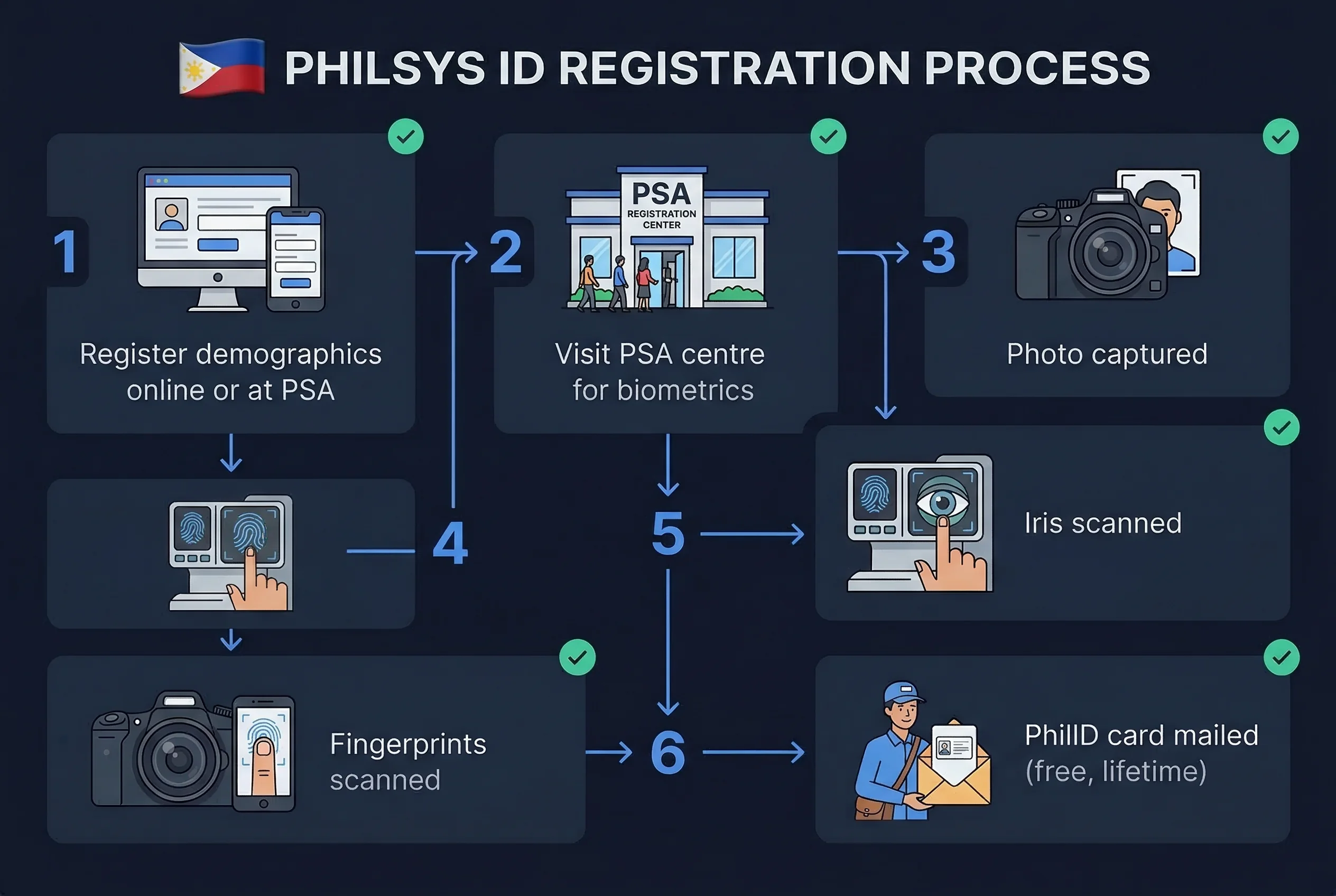
The PhilSys Two-Step Registration Process Explained
PhilSys registration has two distinct phases:
Step 1: Demographics Registration
Done online or at a PhilSys registration centre. You provide:
- Full name, date and place of birth
- Sex, civil status, nationality
- Address
- Contact information
- Supporting documents (PSA birth certificate, passport, etc.)
No biometrics at this step. No photo. This is purely data collection.
Step 2: PhilSys Biometric Capture and Photo
This is where your photo is taken. Step 2 happens at a PSA-designated registration centre — community centres, government offices, malls, or dedicated PhilSys registration sites. The process includes:
- Photo capture: PSA staff photograph you against a standardised background. You sit or stand as directed, face forward, neutral expression.
- Fingerprint scanning: All 10 fingers.
- Iris scan: Both eyes photographed for iris biometric data.
The biometric session takes 15–30 minutes depending on the queue. You receive a transaction slip as proof of Step 2 completion.
After Step 2: Your PhilID is produced and mailed to your registered address. As of 2025–2026, processing times have ranged from several months to over a year due to high registration volume and mailing backlogs in some regions. PSA has worked to reduce this, but delivery timelines vary.
How to Prepare for Your PhilSys Biometric Appointment
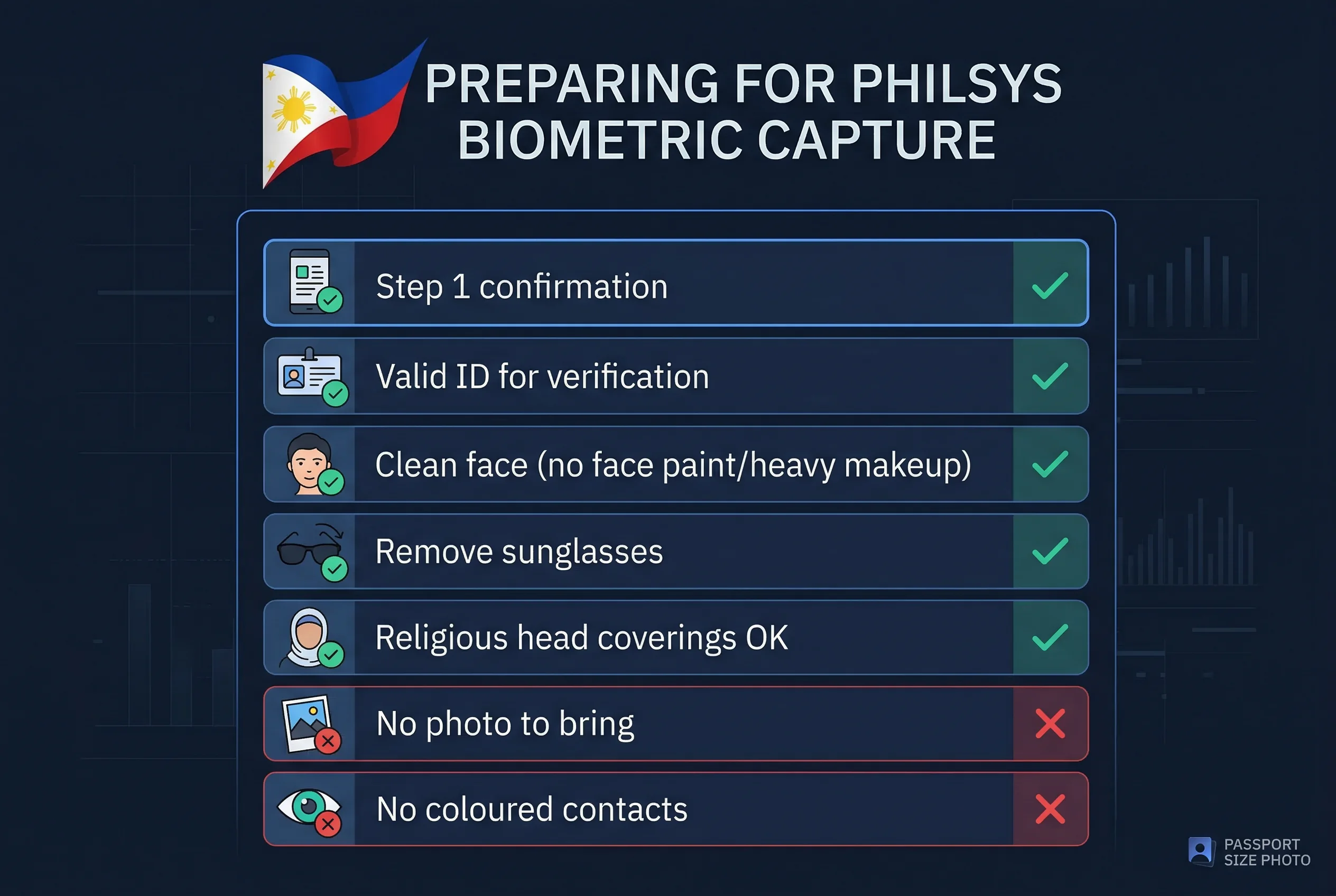
Dress professionally. Your PhilID photo is a lifetime biometric record on a government-issued document. No caps, no hats, nothing that covers your forehead. Wear clean, presentable clothing — the same level of care you'd put into a passport photo.
Face fully visible. No sunglasses. Hair should be off your face. If your hair naturally falls across your forehead, push it back. The camera must capture your full face without obstruction.
Religious head coverings are accepted. Your face — forehead, cheeks, and chin — must be fully visible.
Neutral expression. Look directly at the camera. Mouth closed. No smile, no squint. This is a biometric capture, not a portrait session.
No jewellery obstructing the face. Large earrings, chains near the face, or accessories that could create reflections are worth removing before your appointment.
Required Documents for PhilSys Step 2 Registration
Bring the same documents you submitted in Step 1:
- Primary ID (passport, or any government-issued ID with photo and full name)
- PSA birth certificate (if no primary ID)
- Step 1 transaction reference number or confirmation
PSA staff verify your identity before proceeding with biometrics.
PhilSys Registration for Overseas Filipinos
Filipino citizens abroad can complete Step 1 online and Step 2 at participating Philippine embassies and consulates. The biometric capture process at consulates follows the same protocol. Contact your nearest Philippine consulate or check the DFA website for availability in your country.
PhilSys vs Philippine Driver's License vs Passport
All three are important Philippine documents. Only the PhilID uses on-site biometric capture for the photo. For the other two:
- The Philippine passport requires a 35×45mm portrait photo submitted with your application. Full details at Philippines passport photo requirements.
- The Philippine driver's license requires a 1×1 inch (25.4×25.4mm) photo submitted to LTO. Full details at Philippine driver's license photo guide.
For the passport and driver's licence, passportsize-photo.online can verify your digital photo meets the correct spec before you print or upload. For the PhilID, your only job is to show up to the biometric appointment prepared.
Checking Your PhilSys Registration Status
After completing Step 2, you can check your registration and card delivery status at philsys.gov.ph using your transaction reference number. PSA sends SMS notifications when your card ships.
If your card hasn't arrived after 6 months, check the portal first. Mailing delays — particularly in provinces and overseas — are known issues. The portal shows whether the card was produced and at what stage delivery is.
The Bottom Line on PhilSys ID Photo Registration
PhilSys ID photo preparation is simple: you don't prepare a photo. You prepare yourself. Dress well, arrive with the right documents, and let the PSA staff handle the rest. The biometric capture is fast, the staff are experienced, and the system is straightforward once you're past the registration queue.
The lifetime validity makes it worth showing up looking your best.
Appearance Rules for PhilSys Biometric Photo Capture
Even though PSA captures the photo on-site, how you present yourself determines the quality of a photo that lasts your lifetime.
- Neutral expression — mouth closed, no smile, no frown
- Eyes open — both eyes fully visible, looking directly at the camera (iris scan requires this too)
- No glasses — remove all eyewear before the session, including clear prescription lenses
- Hair away from face — forehead and both eyes fully visible; pin back long hair or bangs
- Head coverings — permitted for religious reasons only; full face from chin to forehead must remain visible
- No caps, hats, or headbands — unless worn for religious purposes
- Clean, professional clothing — the photo appears on a lifetime government document
- No accessories near face — remove large earrings, necklaces near chin level, or reflective items
Philippine Documents Compared: PhilID vs Passport vs DL
| Document | Photo source | Size | Background | Glasses |
|---|---|---|---|---|
| PhilSys ID (PhilID) | On-site capture | PSA standard | PSA standard | Not allowed |
| Philippine Passport | User-submitted | 35×45mm | White | Not allowed |
| Driver's License | User-submitted | 25.4×25.4mm (1×1 in) | White | Not allowed |
The PhilID is the only Philippine document where you don't submit your own photo. For passport and driver's licence photos, you need to prepare and bring compliant prints — and the sizes are different (35×45mm vs 25.4×25.4mm). Do not mix sizes between applications.
Quick Checklist for Step 2 Appointment
- Step 1 completed (demographics registered)
- Transaction reference number saved
- Primary ID ready (passport or government-issued photo ID)
- PSA birth certificate ready (if no primary ID)
- Glasses removed
- Hair pinned back from face
- Professional clothing worn
- No hats, caps, or non-religious head coverings
If You Need a PhilSys ID (PhilID) Replacement
Lost, stolen, or damaged PhilID cards can be replaced through PSA. The replacement process involves a new biometric capture — a new photo, fingerprints, and iris scan — so the same preparation rules apply. Replacement cards carry a fee (first issuance is free). Contact PSA or visit philsys.gov.ph for the current replacement process and fee schedule.