
The Philippines requires a plain white background for all passport photographs submitted to the Department of Foreign Affairs (DFA — Kagawaran ng Ugnayang Panlabas). The background must be pure white with no patterns, gradients, textures, or shadows. Any deviation results in rejection.
Exact Background Rules for Philippine Passport Photos
The background must be:
- White (#FFFFFF) — pure white, not off-white, cream, ivory, or grey
- Uniform — the same shade from edge to edge
- Smooth — no visible texture, grain, or pattern
- Shadow-free — no shadows from your head, body, or hair
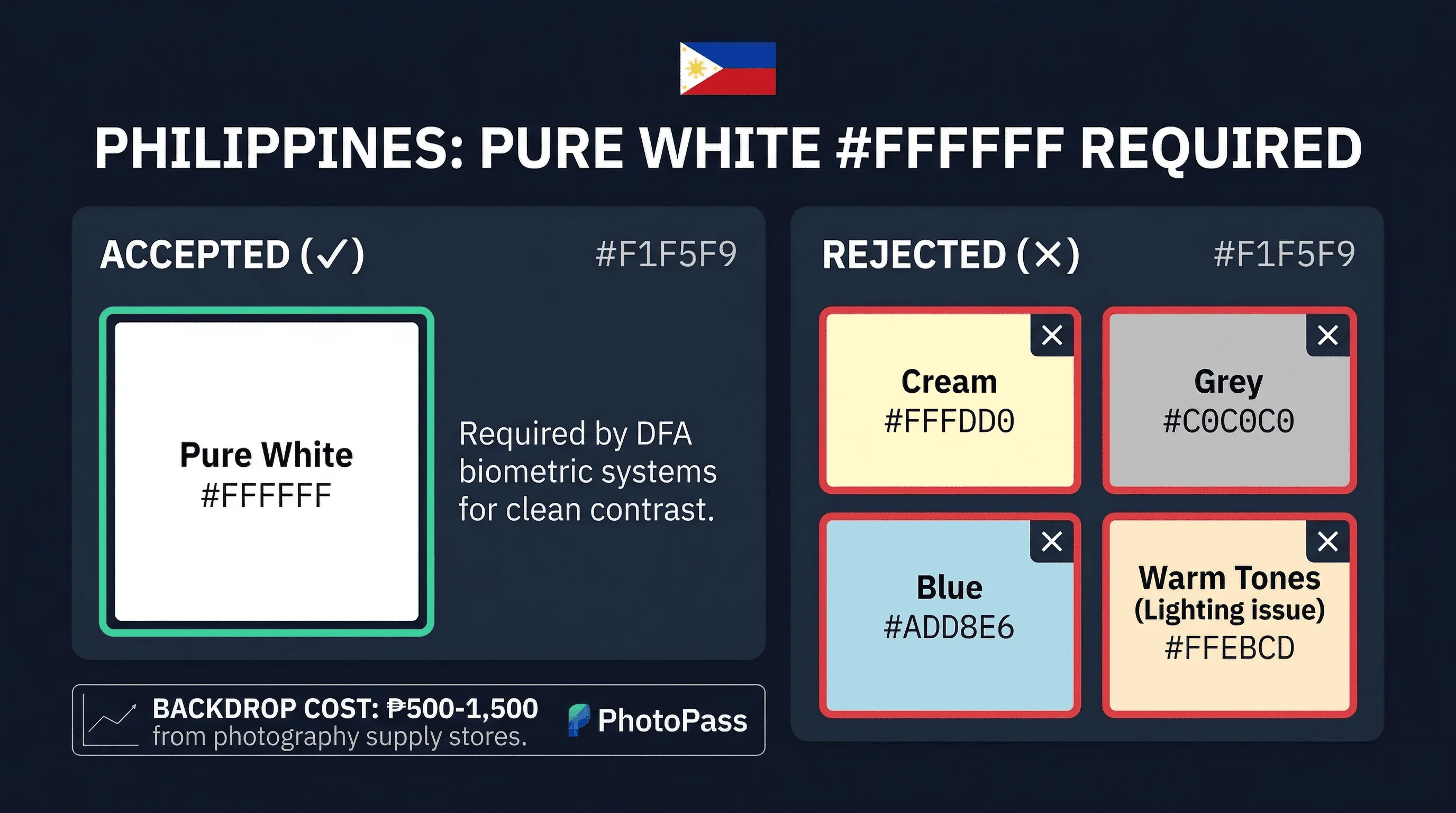
The requirement applies to both printed photos and digital uploads through the DFA Passport Appointment System. The Philippines uses a 35×45mm photo size, matching the standard used by most countries.
Get a compliant passport photo online
What Background Colors Fail for Philippine Passport Photos?
Off-white and cream. Philippine homes often have walls with warm undertones that appear white under indoor lighting but fail digital checks.
Shadows. Standing too close to the wall casts a body shadow. This is the most common DIY failure.
Gradients. A single overhead light (especially fluorescent tubes common in Filipino homes) makes the background brighter at the top and darker at the bottom.
Textured surfaces. Walls with visible texture or wallpaper patterns fail.
Light grey. What passes in Germany or the UK (light grey at 230,230,230) fails in the Philippines.
Philippine Passport Photo Background vs Other Countries
| Country | Background | Notes |
|---|---|---|
| Philippines | White | Plain white required |
| Singapore | White | Same as Philippines |
| Japan | White | Same as Philippines |
| Australia | White | Same as Philippines |
| United States | White | Same as Philippines |
| Canada | White | Same as Philippines |
| France | White | Same as Philippines |
| Germany | Light grey | Different — will fail in Philippines |
| United Kingdom | Light grey | Different — will fail in Philippines |
The Philippines shares its white background with most countries. A white-background photo taken for the US, Japan, or Singapore will have the correct background for the Philippines (verify size and other rules separately).
Where to Get Philippine Passport Photos with White Background
DFA offices. DFA offices in Manila (Aseana), Cebu, Davao, and satellite offices nationwide have photo services on-site. These are DFA-accredited and guarantee compliance. Cost: ₱300–500. This is the most reliable option.
DFA-accredited photo centres. Accredited centres near DFA offices produce compliant photos. Look for the DFA accreditation. Cost: ₱300–500.
Mall photo services. Photo centres in SM, Robinsons, Ayala, and other malls offer passport photos. Cost: ₱150–300. Quality varies — verify the white background before accepting.
Professional studios. Dedicated photo studios in major cities produce higher-quality photos with proper lighting. Cost: ₱300–800.
OFWs and Filipinos abroad. The Philippines has one of the world's largest diaspora communities. Filipino workers (OFWs) and residents abroad can have photos taken locally and submit them to the Philippine embassy or consulate. Specify "white background, Philippine passport" and verify the result. In cities with large Filipino communities — Dubai, Riyadh, Hong Kong, Singapore, Los Angeles, London — studios near the consulate typically understand the requirements.
How to Create a White Background at Home for Philippine Photos
The White Wall Method for Philippine Passport Photos
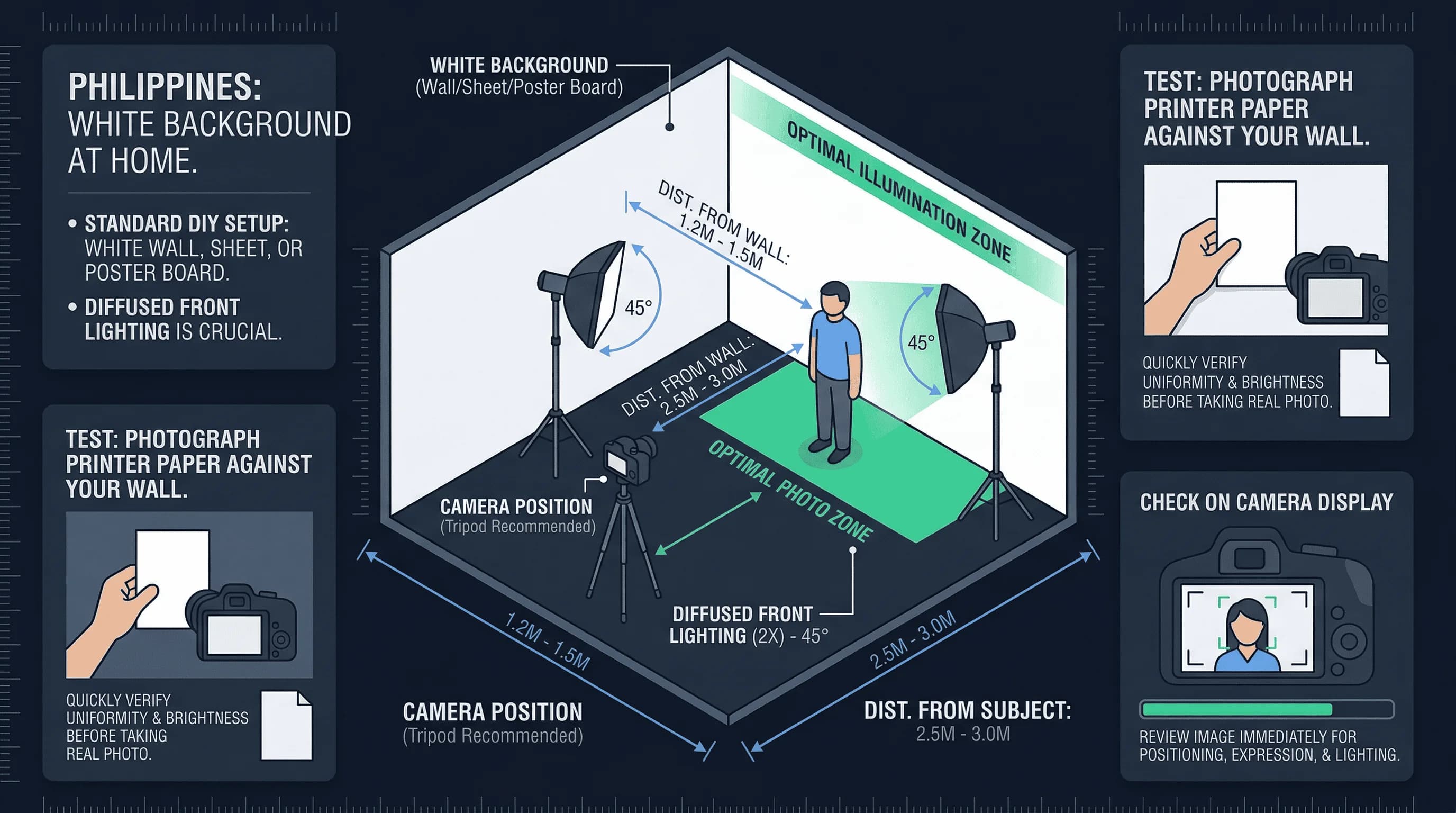
- Find a smooth white wall. Interior walls painted flat white work best. Test by placing a sheet of printer paper against the wall.
- Stand 40–60cm from the wall. This gap eliminates your body shadow.
- Use two light sources at 45 degrees. Cross-lighting cancels shadows.
- Use daylight bulbs (5000K+). Standard warm bulbs cast yellow. Switch to daylight bulbs.
- Check the result on a computer screen. Zoom into the background — it should be uniformly white.
The Foam Board Method for Philippine Passport Photos
White foam board from a school supply store or National Book Store works well. A3 or larger is sufficient. These are already perfectly white and easy to position.
Natural Light Method for Philippine Passport Photo Backgrounds
The Philippines' tropical climate provides abundant natural light. Position yourself near a large window on a slightly overcast day. The cloud cover diffuses the light evenly. Avoid direct sunlight, which creates harsh shadows and excessive contrast. Morning light (before 10 AM) is softer than midday sun.
Paper Roll Method for Philippine Passport Backgrounds
White seamless background paper from a photography supplier provides the cleanest result. Available at camera shops in Quiapo (Manila) and specialty stores. Hang it behind you and let it curve to eliminate seams.
DFA Appointment Photo Tips for Philippine Passport Photos
When you book a DFA passport appointment, photos are typically taken at the office. However, the DFA also accepts photos taken externally — they must meet all requirements. If you bring your own photos:
- Ensure the background is pure white
- Print on photo paper (not regular paper)
- Bring the digital file as backup
- Arrive with photos that have not been laminated or mounted
If the DFA office takes your photo on-site, the background will be correct. Staff use calibrated white backgrounds.
The Shadow Problem in Philippine Passport Photo Backgrounds
Shadows are the most common background issue.
The fix: distance. Stand 40–60cm from the wall.
Phone flash creates the worst shadows. Disable it and use room lighting or window light.
Two lights eliminate most shadows. Position lamps at 45 degrees on each side. If a faint shadow remains, add a third light aimed at the background.
Overhead fluorescent tubes create shadow bands between your body and the wall. Switch to side lighting.
Philippine Passport Photo Background Rules for Babies
Infants and young children must meet the same white background requirement.
Newborns and infants. Lay the baby on a plain white sheet and photograph from directly above. Ensure even lighting and no wrinkles.
Toddlers. Seat the child against a white background. An assistant can hold the child's attention above the camera.
Children's passports in the Philippines require renewal every 5 years. A new photo is needed each time. DFA-accredited centres are recommended for children's photos.
Common Philippine Passport Photo Background Mistakes
Yellow lighting. Warm bulbs make white walls photograph as cream. Switch to daylight bulbs or use natural light from a window.
Using fabric backdrops. Fabric wrinkles create shadows and texture. Use paper, foam board, or a smooth wall.
Overexposing the background. Extreme brightness creates a glow. White, not blindingly bright.
Heavy digital editing. Minor brightness adjustments are fine. Aggressive background replacement raises authenticity concerns.
Non-accredited photo shops. Some mall and sari-sari store photo services may not understand DFA requirements. Use DFA-accredited centres when possible.
Using old photos. Photos must be recent (within the last 6 months). Old photos may also have the wrong background if they were taken for a different document.
Confusing passport and visa photos. Some countries require different specifications for visa photos. Verify you are using the correct format for a Philippine passport specifically.
Verifying Your Philippine Passport Photo Background
Before submitting, check:
- Background is white across the entire frame
- No visible shadows behind you
- No texture, pattern, or seam visible
- Background extends beyond all edges
- Lighting is even from top to bottom, left to right
Use our passport photo checker to verify your background meets DFA requirements. For Philippines passport photo size requirements, see the Philippines passport photo size guide. View the complete requirements on the Philippines hub page.