OCI (Overseas Citizen of India) card photos must measure 2×2 inches (51×51mm) against a white background — 600×600 pixels at 300 DPI. This is a different size from Indian passport photos, which use 35×35mm. The OCI format matches the US passport photo standard, which makes sense since most OCI applicants are based in the United States and other Western countries. Requirements differ between minor and adult applicants.
Over 4 million Overseas Citizens of India live worldwide, with the largest populations in the United States, United Kingdom, Canada, and Australia. Understanding OCI photo requirements prevents application rejections that can delay processing by months.
If you're an Indian citizen looking to understand all ID photo requirements, our pricing page outlines the various services available for document photo compliance.
OCI Card Photo Specifications: 2×2 Inch (51×51mm)
All OCI card photos must meet these core requirements:
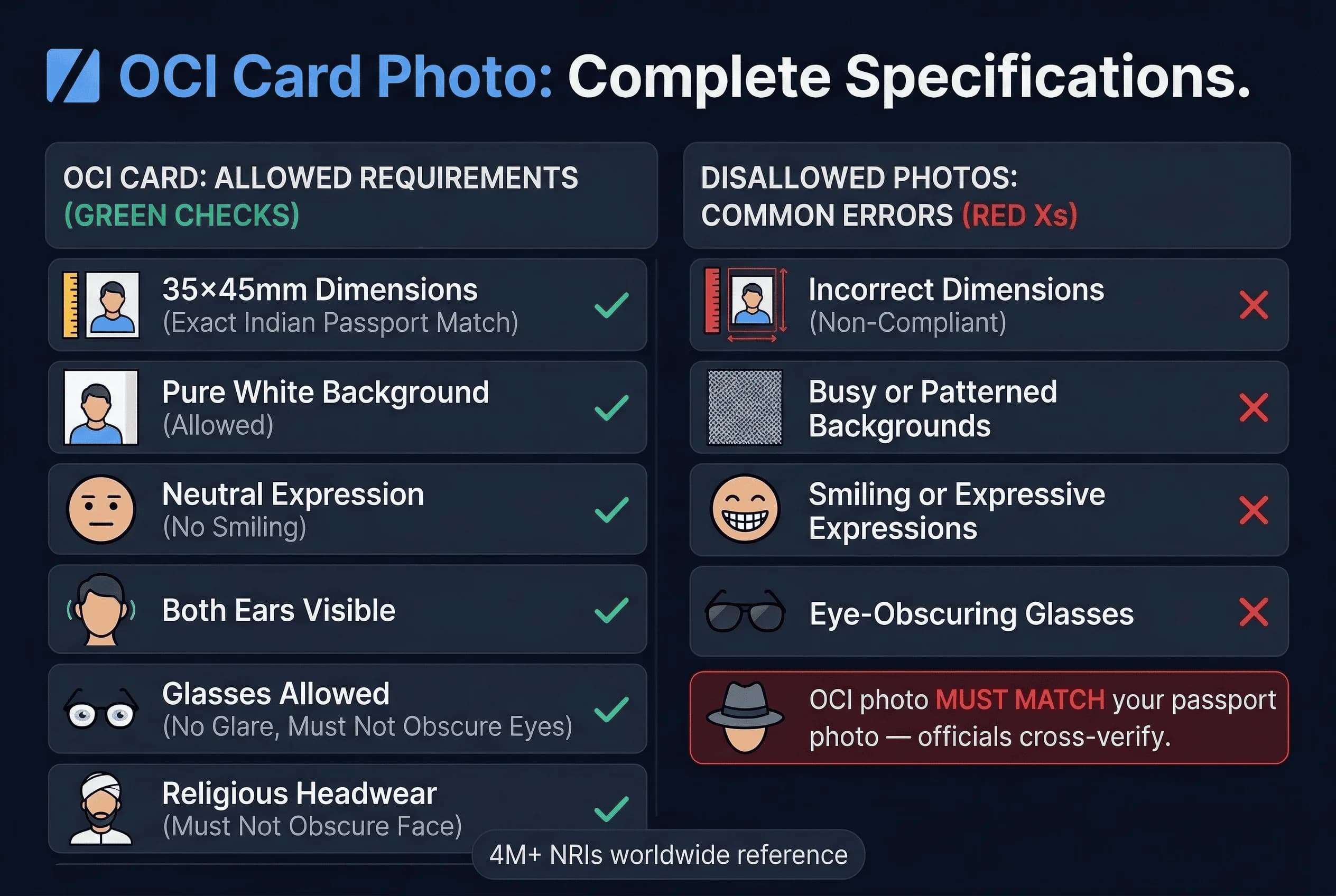
Dimensions: 2×2 inches (51×51mm), 600×600 pixels at 300 DPI Background: Plain white (#FFFFFF) Appearance: Full frontal face, both ears visible Expression: Neutral, mouth closed Glasses: Not permitted Head height: 49–69% of the frame Headwear: Not permitted except for religious reasons
Note: OCI card dimensions (2×2 inches) are different from Indian passport dimensions (35×35mm). Do not assume your Indian passport photo will work for your OCI application — the sizes are not the same.
Get a compliant passport photo online
The Critical OCI Passport Photo Matching Rule
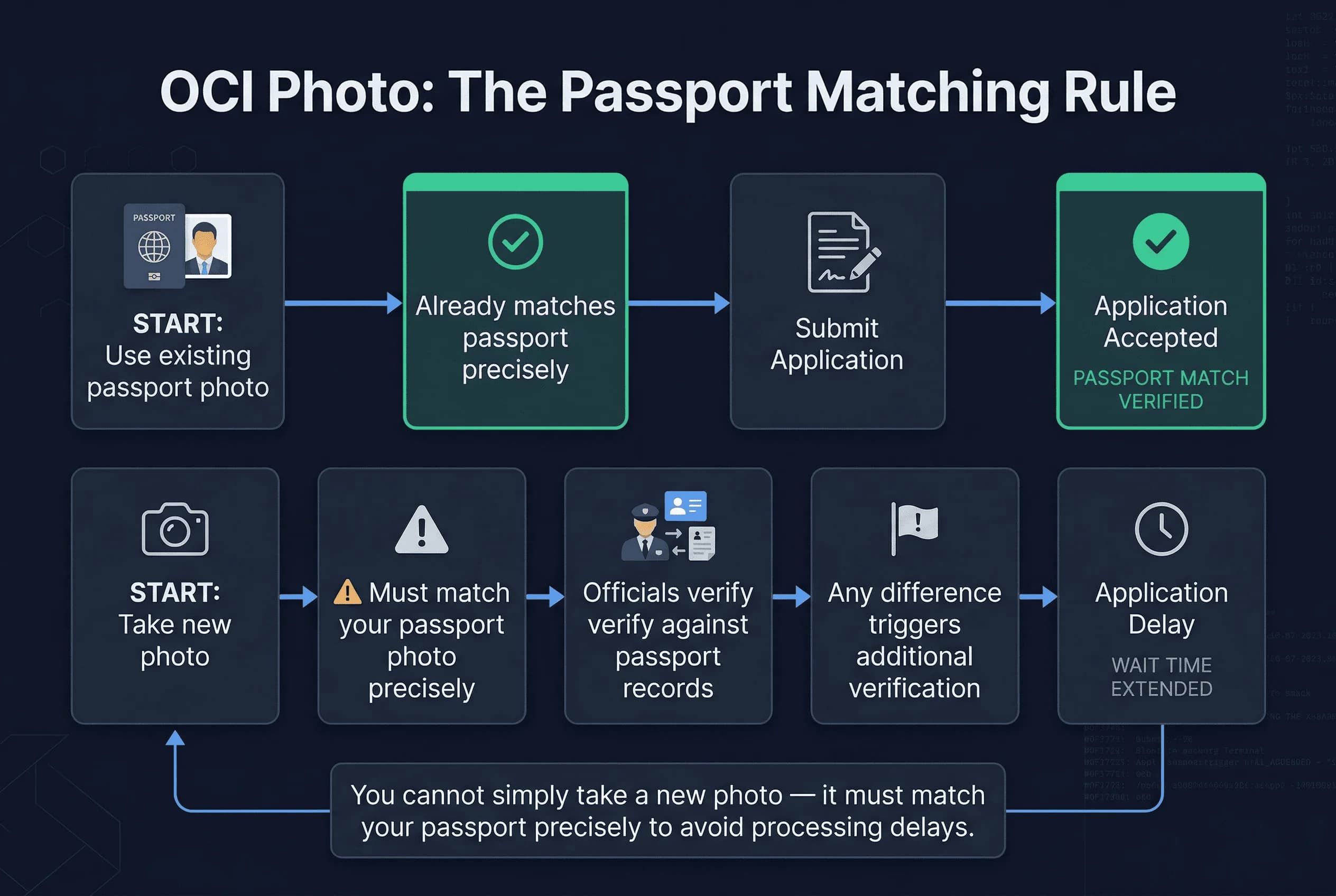
Unlike other ID photo requirements, OCI applications require your photo to match your passport photograph precisely. This rule exists because the OCI system links directly to your passport records.
When you submit your OCI application, officials verify that your OCI photo matches your passport photo in their system. Any significant difference triggers additional verification steps that delay processing.
This means the person in your OCI photo must look the same as in your passport photo — same appearance, same recency. However, because the OCI card uses 2×2 inch dimensions while Indian passports use 35×35mm, you will need to produce a separate photo file in the correct OCI dimensions even if the source image is the same.
Minor vs Adult OCI Card Photo and Application Requirements
OCI applications treat minors differently from adults in several important ways:
Minor applicants (under 18)
- Both parents must be present or provide notarized consent
- Photo requirements are more lenient on facial expression
- Parents' photos may be required for verification
- Application requires guardian signature
Adult applicants (18 and older)
- Standard photo requirements apply strictly
- Biometric enrollment required (fingerprints)
- Personal appearance may be required at some consulates
The photo for a minor OCI applicant should still meet 2×2 inch white background specifications, but minor applicants often get more flexibility on exact positioning.
Common OCI Photo Issues for NRIs Applying from Abroad
Non-Resident Indians frequently encounter photo-related problems that applicants in India don't face:
Problem 1: Local photo services don't know Indian specs
Photo studios in the US, UK, Canada, and Australia can easily produce OCI photos since the 2×2 inch format matches the US passport standard. However, if you also need an Indian passport photo (35×35mm), you'll need to request that size separately — it's not the same as the OCI card size.
Problem 2: Background color confusion
Many Western photo services default to light gray or blue backgrounds. These fail Indian government standards. Request a white background explicitly, or use your own white backdrop.
Problem 3: Expression standards differ
Western photo services often encourage slight smiles. Indian government photos require neutral expressions. The difference seems minor but can cause rejection.
Problem 4: File size confusion
Online OCI applications through the Saral portal have different file size limits than physical submissions. The portal typically requires JPEG files under 200KB.
OCI Application: Online Portal vs Consular Processing
OCI applications can be submitted through two pathways:
Online application (recommended)
The Ministry of Home Affairs OCI portal accepts applications worldwide. After online submission, applicants must visit the nearest Indian consulate for biometric enrollment and document verification. The photo uploads directly to the portal. This method offers tracking capabilities and typically faster processing times.
Consular application
Some Indian missions accept physical applications with printed photos. This option suits those uncomfortable with online processes but typically takes longer to process. Physical applications require more documents in person and cannot be tracked as easily.
Both methods require the same photo specifications. The online portal enforces file size limits strictly, while physical submissions are more lenient but still require compliance with 2×2 inch white background rules.
OCI Photo Specifications: Detailed Technical Breakdown
Understanding the exact technical requirements helps prevent application issues:
Physical dimensions
- Width: 51mm (2 inches)
- Height: 51mm (2 inches)
- Aspect ratio: 1:1 (square)
Digital specifications (for online submission)
- Format: JPEG only
- File size: Under 200KB
- Resolution: 600×600 pixels at 300 DPI
- Color mode: RGB
Image quality
- Clear, sharp image required
- No shadows on face or background
- Even lighting across entire photo
- No red-eye or glare
Facial positioning
- Centered in frame
- Face should occupy approximately 80% of vertical space
- Both eyes at same level
- Ears must be visible (this catches many applicants)
Required Photos and Documents for OCI Application
Prepare these items before starting your OCI application:
For online submission
- One digital photo (JPEG, under 200KB, 600×600 pixels)
- Scanned copy of current passport
- Proof of Indian origin (ancestral birth certificate, old passport copies)
- PIO card (if applicable)
For consular submission
- Two printed photos (2×2 inches / 51×51mm, white background)
- All supporting documents in original plus copies
Having photos ready before beginning the application prevents delays during the submission process. Many applicants rush to find photos after starting their application, causing unnecessary stress.
OCI Surrender Certificate Photo Requirement for Former Citizens
Former Indian citizens who have acquired foreign citizenship must obtain a Surrender Certificate before applying for OCI. This adds another photo requirement to the process.
The Surrender Certificate application requires:
- Two 2×2 inch (51×51mm) photos with white background
- Original Indian passport (for cancellation)
- Naturalization certificate from new country
- Proof of Indian origin
The photo requirements for the Surrender Certificate match OCI specifications exactly — 2×2 inches, white background. Many applicants handle both applications simultaneously, using the same photo set for both processes.
Recent Changes to OCI Card Photo Requirements (2024-2026)
The OCI photo requirements have remained stable, but application procedures continue evolving. In 2024, the government introduced stricter biometric verification, making accurate photos even more important for system matching.
The introduction of the OCI card with upgraded security features in 2025 means newer cards require higher resolution photos than earlier versions. Ensure your photo meets current pixel specifications, not just the minimum requirements.
Looking ahead, the Indian government continues digitizing OCI services. Future updates may introduce facial recognition technology that matches OCI photos against live verification, making compliance increasingly important.
Tips for NRIs Getting Compliant OCI Card Photos
Follow these strategies to ensure success:
Strategy 1: Request specifically
Request "Indian passport size" specifically when booking photo appointments. Most professional photographers can produce this size even if unfamiliar with Indian requirements. Bring a reference image showing exact dimensions.
Strategy 2: DIY with smartphone
Take your own photo against a white wall using good lighting. Modern smartphones produce excellent images that can be resized to meet requirements. Crop to a 1:1 square and resize to 600×600 pixels at 300 DPI.
Strategy 3: Use existing passport photo
Keep digital copies of your passport photo saved. Since OCI requires matching your passport photo, having the original file makes the OCI submission much easier.
Strategy 4: Time your passport renewal
If your passport is more than two years old, consider renewing it before applying for OCI. The photo comparison becomes simpler with a recent passport.
Common OCI Card Photo Mistakes That Cause Rejection
These errors cause application rejections:
Assuming your Indian passport photo works for OCI. The OCI card uses 2×2 inches while the Indian passport uses 35×35mm — different dimensions.
Submitting photos with colored backgrounds. The white requirement is strictly enforced, with even slight off-white tones triggering rejection.
Failing to match passport photo exactly. The system compares both images automatically, and significant differences cause delays.
Taking new photos instead of using passport photos. This seems counterintuitive but is a common mistake among first-time applicants who want a "fresh" photo.
Ignoring file size limits. The 200KB rule applies to all online submissions, and exceeding this causes immediate rejection without error message.
Having unprofessional appearance. Photos should look like a professional document photo, not a casual snapshot. Proper attire and grooming matter more than applicants realize.
OCI Card Processing Timeline and What to Expect
OCI processing takes 8-12 weeks from document verification to card issuance. Photo-related issues can extend this significantly if additional verification is required.
After online submission, you'll receive an acknowledgment with an application number. Use this to track status on the OCI portal. Schedule your consulate appointment promptly to avoid delays. Bring all original documents and extra photos to your appointment.
The OCI card itself arrives by post. Some consulates offer expedited processing for additional fees if you need the card urgently.
Related Articles
- PAN Card Photo Requirements — Related Indian ID documentation
- Strictest Passport Photo Rules Ranked — Understanding India's strict photo standards