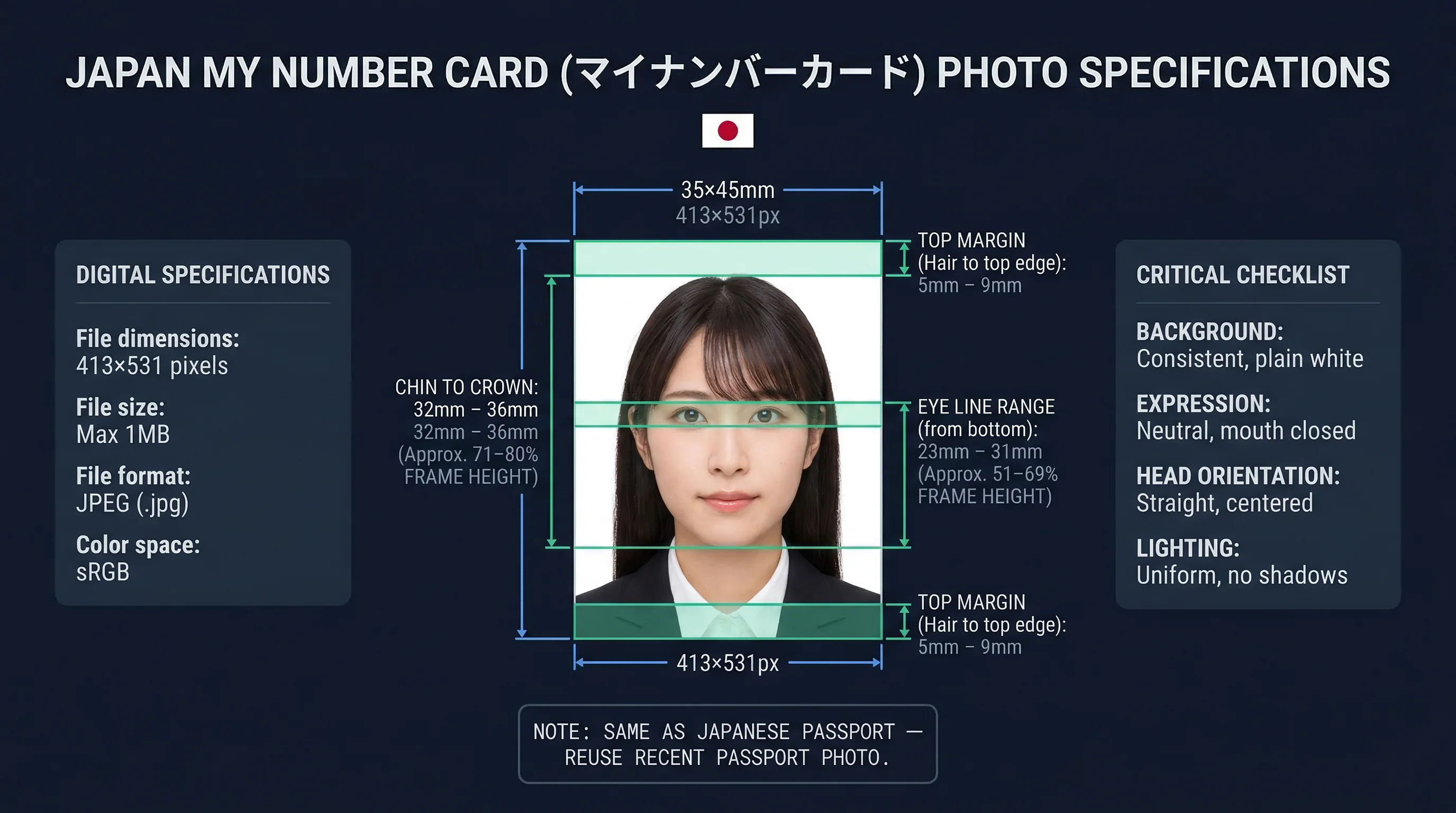
Japan's My Number Card (マイナンバーカード) uses the same photo specs as a Japanese passport — 35×45mm, white background, 413×531 pixels at 300 DPI. If you've had a passport photo taken within the past 6 months, you can use it for your My Number Card application without any changes.
Japan My Number Card Photo Specifications (35×45mm)
| Specification | Requirement |
|---|---|
| Print size | 35×45mm |
| Digital size | 413×531 pixels |
| Resolution | 300 DPI |
| Background | White (RGB 255,255,255) |
| Glasses | Not allowed |
| Smile | Not allowed |
| Expression | Neutral, mouth closed |
| Issued by | Municipal government (市区町村) |
| Processing time | 1–2 months |
| Fee | Free (first issue) |
| Validity | 10 years (adults), 5 years (minors under 18) |
Get a compliant passport photo online
My Number Card vs Japanese Passport Photo Comparison
The photo specifications are identical. Same size, same background, same expression requirements.
| Specification | My Number Card (マイナンバーカード) | Japanese Passport (旅券) |
|---|---|---|
| Print size | 35×45mm | 35×45mm |
| Digital size | 413×531px | 413×531px |
| Background | White | White |
| Recency | Within 6 months | Within 6 months |
One practical point: if you apply for both a My Number Card and a Japanese passport in the same period, a single set of photos covers both applications. The photos must be taken within 6 months of each submission date — plan accordingly if you're submitting to different offices weeks apart.
What Is Japan's My Number Card and How Is It Used?
Japan's My Number Card is the country's national ID card, issued under the Social Security and Tax Number system (マイナンバー制度) introduced in 2016. The 12-digit "My Number" (個人番号) is Japan's individual identification number — equivalent to a national ID number in other countries.
The card itself functions as:
- A government-issued photo ID accepted at banks, airports, and government offices
- A digital certificate holder for online authentication
- A health insurance card (since 2021, card-based health insurance is supported)
- An interface for accessing government digital services via the government's Myna Portal
Carrying a My Number Card is not legally required — the number is mandatory, but using the card to present it is optional. That said, the Japanese government has been actively moving services onto the card-based system, and holding a physical card makes many bureaucratic processes faster.
How to Apply for a My Number Card Online (Portal Upload)
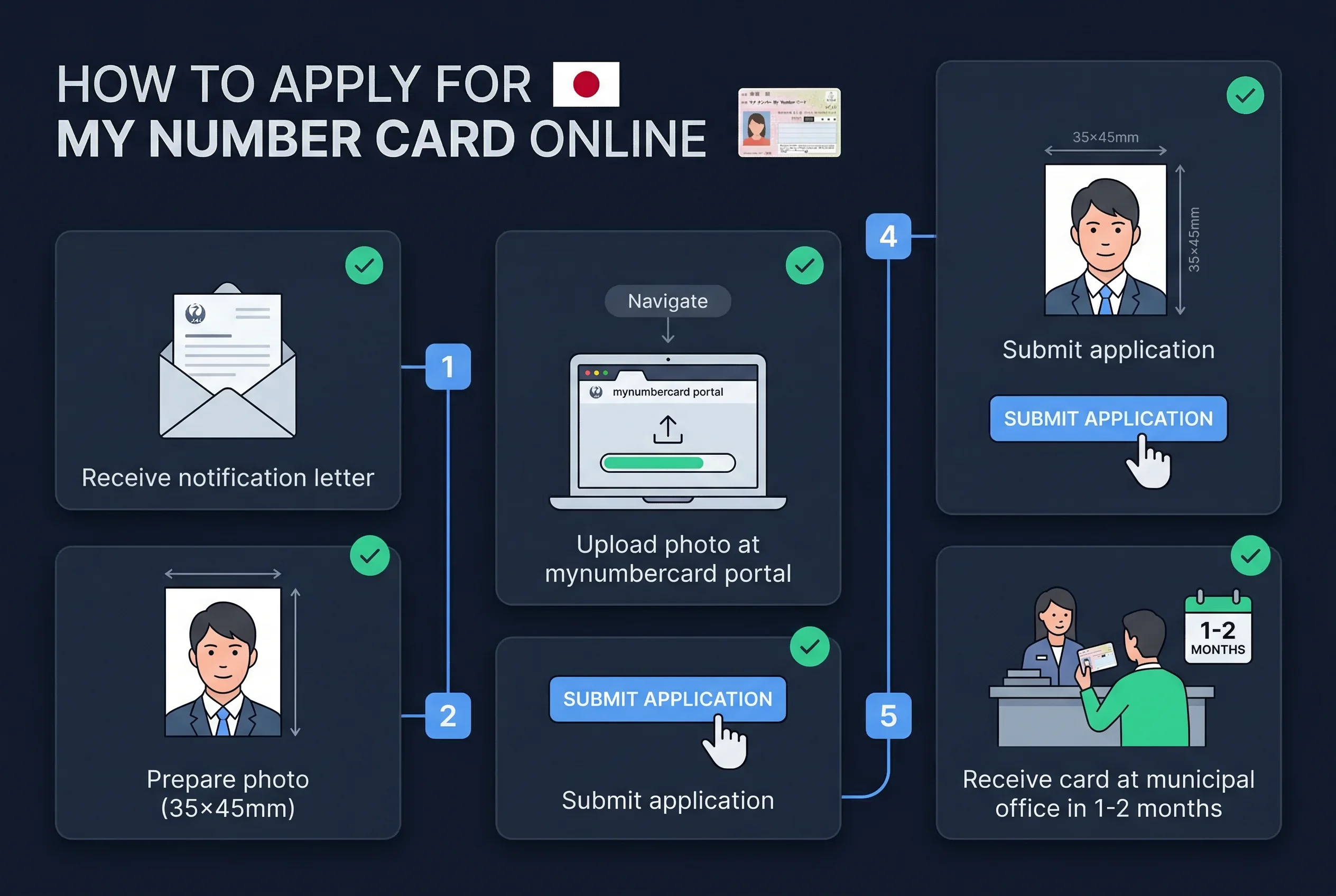
Online application is the most common route. The process:
- Receive your My Number notification card (通知カード) by mail — this arrives after your address registration (住民票) is confirmed
- Visit the My Number Card application portal (mynumbercard.point.soumu.go.jp) or use the dedicated smartphone app
- Upload a digital photo meeting the 35×45mm / 413×531px specifications
- Submit and wait 1–2 months for the physical card to be ready
- Collect the card in person at your municipal office with your notification card and ID
For the digital upload, the photo file requirements are:
- Format: JPG / JPEG
- File size: 20KB–7MB
- Dimensions: 413×531px recommended
- Background: Pure white (RGB 255,255,255)
- Taken within: 6 months of submission
The portal also accepts photos taken on a smartphone — the app has a built-in photo capture function. If you use the app, ensure good lighting, a white background, and a neutral expression.
Verify your photo dimensions meet the 413×531px requirement before uploading to the portal.
Applying for a My Number Card at the Municipal Office
If you prefer to apply in person, visit your local city hall or ward office (市役所 / 区役所). Bring:
- Your My Number notification card (通知カード)
- A 35×45mm print photo taken within the past 6 months
- A supporting ID document (passport, driver's license, or Residence Card for foreign nationals)
The municipal office will provide an application form. After submission, you wait 1–2 months for your card to be processed, then return to the office to collect it.
Processing times have varied — during high-uptake periods, some municipalities have reported waits longer than 2 months. Budget extra time if you need the card by a specific date.
My Number Card Validity, Certificate Renewal, and Photos
My Number Card validity is tied to the embedded certificates, not just the physical card:
- Physical card: 10 years (adults), 5 years (minors under 18)
- Electronic certificate: 5 years (adults and minors)
When the electronic certificate expires after 5 years, you renew it at the municipal office — the physical card stays the same. When the physical card itself expires (at 10 years for adults), you apply for a new one and submit a new photo.
The renewal photo must meet the same 35×45mm specification. The 6-month recency rule applies at renewal just as it does at first issue.
Municipal offices send renewal notices by post roughly 3 months before a certificate or card expiry date. Bring the renewal notice, your expiring card, and a new 35×45mm photo (or upload digitally through the portal) when you attend. Processing at the office is typically same-day for certificate renewals; card replacement still takes 1–2 months for a new physical card to arrive.
The My Number Card photo matches the Japanese passport exactly — 35×45mm, white background, neutral expression, taken within 6 months. If you already have a passport photo, you can use it. If you're applying fresh, one photo session covers both documents.
Expression and Appearance Rules for My Number Card Photos
The My Number Card applies the same biometric standard as the Japanese passport:
- Mouth closed — no teeth visible, lips together gently
- Neutral expression — no smiling, no frowning
- Eyes open — both eyes fully visible, looking directly at the camera
- No glasses — all types banned, including clear prescription lenses and reading glasses
- Hair away from face — forehead visible, hair must not obscure the eyes or eyebrows
- Head coverings — only for religious or medical reasons; face from chin to forehead must remain visible
- Natural appearance — no heavy makeup that significantly alters your features
The no-glasses rule is consistent across all Japanese identity documents that require white backgrounds (passport, My Number Card, Residence Card). Only the driver's licence allows glasses — and it uses a different background colour entirely.
Japanese Documents Compared: My Number Card vs Passport
| Document | Size | Background | Glasses | Smile |
|---|---|---|---|---|
| My Number Card | 35×45mm | White | Not allowed | Not allowed |
| Japanese Passport | 35×45mm | White | Not allowed | Not allowed |
| Residence Card | 30×40mm | White | Not allowed | Not allowed |
| Driver's Licence | 24×30mm | Light blue | Allowed | Not allowed |
| Japanese Visa | 45×45mm | White | Not allowed | Not allowed |
Note the significant variations: the driver's licence is the smallest format (24×30mm) with a light blue background and glasses allowed. The visa is square (45×45mm). The My Number Card and passport share identical specifications — making them the easiest pair for a single photo session.
Quick Checklist for Japan My Number Card Photo Submission
- Size: 35×45mm (413×531px at 300 DPI)
- Background: white (RGB 255,255,255)
- Expression: neutral, mouth closed
- No glasses (any type)
- Photo taken within 6 months
- Digital file: JPEG, 20KB–7MB
- Notification card (通知カード) ready
Visit the Japan country page for a complete overview of Japanese document photo requirements. Verify your photo with the passportsize-photo.online checker before uploading to the My Number portal.