US passport photos require a plain white background for all submissions to the Department of State. The background must be white with no patterns, gradients, textures, or shadows. The State Department's language says "white or off-white," but in practice, pure white is the safest choice.
Exact Background Rules for US Passport Photos
The background must be:
- White (#FFFFFF) — pure white is the target
- Uniform — the same shade from edge to edge
- Smooth — no visible texture, grain, or pattern
- Shadow-free — no shadows from your head, body, or hair
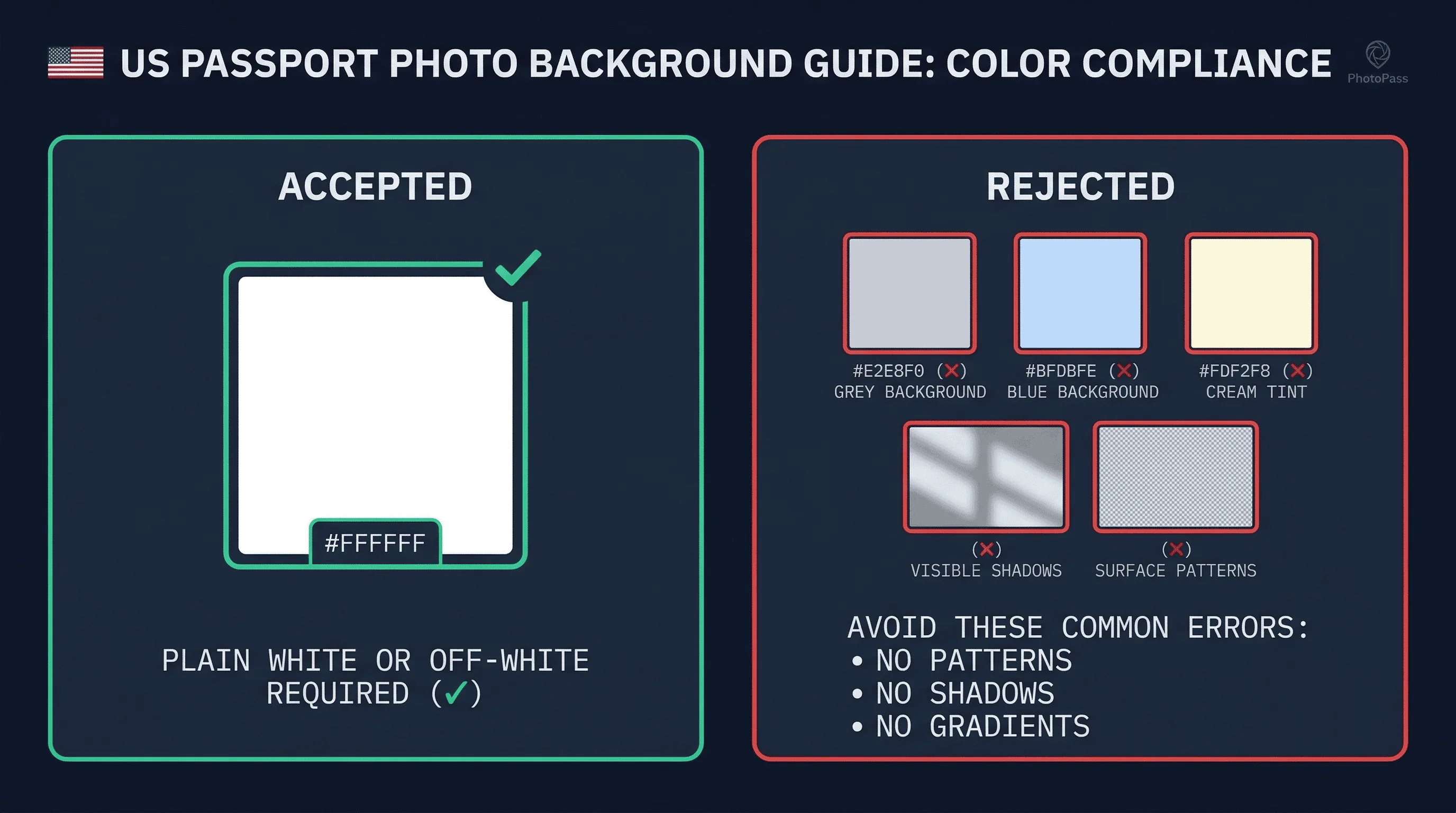
The State Department says "white or off-white" is acceptable. But off-white is vague — if the off-white is visible as cream, yellow, or grey to the eye, it will likely be flagged. Use pure white and eliminate any ambiguity.
The US uses a 51×51mm (2×2 inch) square photo — unlike the 35×45mm rectangular format used by most countries. This means the white background must be uniform across a perfectly square frame.
Get a compliant passport photo online
What Background Colors Fail for US Passport Photos?
Off-white and cream. Most walls that appear white contain warm undertones invisible to the eye but detectable by processing systems.
Shadows. Standing too close to the wall casts a body shadow. This is the most common DIY failure.
Gradients. A single overhead light makes the background brighter at the top and darker at the bottom.
Outdoor photos. Blue sky, overcast grey, or any non-white outdoor background is rejected. Even an overcast sky reads as grey or blue in the image.
Textured or patterned backgrounds. Wallpaper, fabric weave, or visible wall texture fails.
Light grey. What passes in Germany or the UK (light grey at 230,230,230) is too dark for US passports.
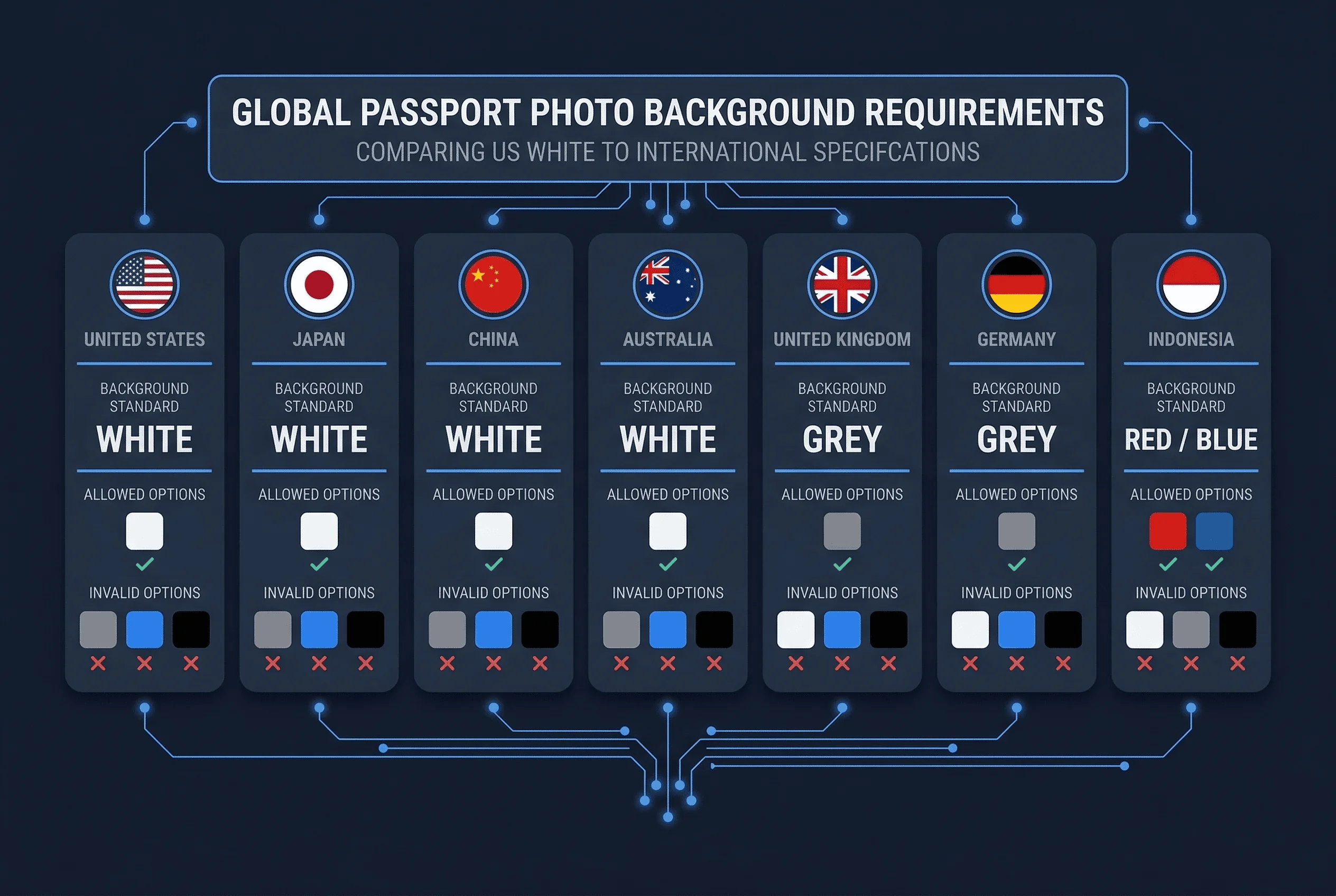
US Passport Photo Background vs Other Countries
| Country | Background | Notes |
|---|---|---|
| United States | White | Plain white required |
| Canada | White | Same as US (different size: 50×70mm) |
| France | White | Same as US (different size: 35×45mm) |
| Japan | White | Same as US (different size: 35×45mm) |
| Australia | White | Same as US (different size: 35×45mm) |
| India | White | Same as US (different size: 35×35mm) |
| Germany | Light grey | Different — will fail in US |
| United Kingdom | Light grey | Different — will fail in US |
The US shares its white background with most countries. However, the US square format (51×51mm) is unique — a photo taken for a European country will have the wrong shape for the US, even if the background is correct.
Where to Get US Passport Photos with Correct Background
CVS, Walgreens, RiteAid. Most pharmacy locations offer passport photos. Cost: $15–20. Staff take your photo against a white background, print it, and hand you prints. Quality varies by location and staff experience.
USPS (Post Offices). Many post offices offer passport photo services. Cost: $15. Convenient if you are applying for a passport at the same location.
Costco, Walmart, Target. Select locations offer passport photo services. Cost: $7–15. Costco's photo centres are generally reliable.
AAA offices. AAA members can get passport photos at AAA offices. Cost: $10–15. Staff are experienced with the requirements.
Professional photography studios. Studios in most cities produce compliant photos. Cost: $20–50. Useful if you need specific accommodations.
Americans abroad. US embassies and consulates can direct you to approved local photographers. Photos taken for most other countries (France, Japan, Australia) will have the correct white background, but the size will be wrong — the US square format must be specifically requested.
How to Create a White Background for US Passport Photos
The Wall Method for US Passport Photo Backgrounds
- Find a smooth white wall. Interior walls painted flat white work best. Test by placing a sheet of printer paper against the wall.
- Stand at least 50cm (20 inches) from the wall. This gap eliminates your body shadow.
- Use two light sources at 45 degrees. Cross-lighting cancels shadows.
- Use daylight bulbs (5000K+). Standard warm bulbs cast yellow.
- Check the result on a computer screen. Zoom into the background — it should be uniformly white.
The Poster Board Method for US Passport Photos
A 22×28 inch white poster board from any craft store (Michaels, Hobby Lobby, dollar stores). This is portable and reliably white. Hold it behind you or tape it to a wall.
The Sheet Method for US Passport Photo Backgrounds
A clean white bedsheet hung flat against a wall. Iron or steam it first — creases cast shadows that appear in the photo.
Why Lighting Matters for US Passport Photo Backgrounds
A white wall does not guarantee a white background in the final photo. Lighting determines how the camera captures it.
Warm lighting (2700K) casts yellow tones. White walls photograph as cream. Switch to daylight bulbs (5000K+).
Uneven lighting creates gradients. Brighter at the top, darker at the bottom. Use multiple light sources placed symmetrically.
Underlit backgrounds appear grey even when the physical surface is white. If your face receives more light than the background, the background will photograph darker.
Natural light is best. A large window on an overcast day provides even, neutral illumination. Position yourself perpendicular to the window against a white backdrop.
How to Fix Shadow Problems in US Passport Photos
Shadows are the most common background issue.
The fix: distance. Stand at least 50cm (20 inches) from the wall. The gap gives the shadow space to fall below the frame.
Phone flash creates the worst shadows. The built-in flash casts a sharp shadow directly behind your head. Disable it and use room lighting or window light.
Two lights eliminate most shadows. Position lamps at 45 degrees on each side. If a faint shadow remains, add a third light aimed at the background.
US Baby and Child Passport Photo Background Rules
Newborns and infants. Lay the baby on a plain white sheet and photograph from directly above.
Toddlers. Seat the child in a car seat or high chair against a white background.
Children under 16 require a parent or guardian signature on the passport application. The photo must meet the same background requirements as adult photos. Children's passports are valid for 5 years (vs 10 for adults aged 16+). A new compliant photo is needed at each renewal.
Common Background Mistakes in US Passport Photos
Outdoor photos. Any non-white outdoor background (sky, grass, buildings) is rejected. Take the photo indoors.
Yellow lighting. Warm bulbs make white walls photograph as cream. Switch to daylight bulbs.
Using a patterned wall. Wallpaper, textured paint, or walls with visible switch plates or decorations fail.
Wrong aspect ratio. US passport photos are square (2×2 inches / 51×51mm). A rectangular photo from another country will not work even if the background is white.
Digital file too large. For online submissions, the State Department requires JPEG format, under 240KB. A high-resolution photo may need compression.
How to Verify Your US Passport Photo Background
Before submitting, check:
- Background is white across the entire frame
- No visible shadows behind you
- No texture, pattern, or seam visible
- Background extends beyond all edges
- Photo is square format (2×2 inches)
Use our passport photo checker to verify compliance with State Department standards. For US passport photo size requirements, see the US passport photo size guide. View the complete requirements on the United States hub page.