
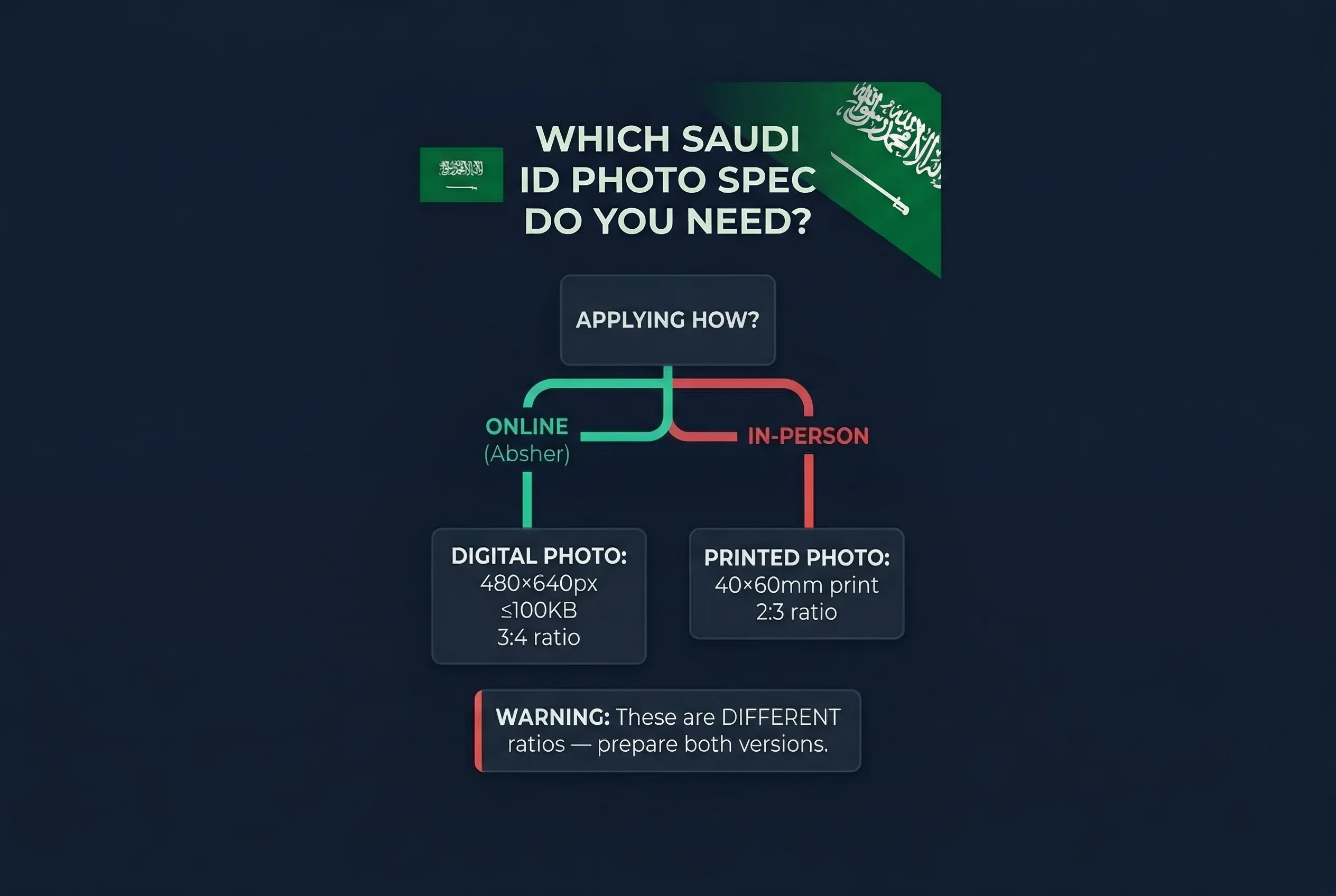
The Saudi National ID (بطاقة الهوية الوطنية) has two different photo specifications — one for the printed card and one for the Absher digital upload. They are not interchangeable. A 40×60mm print photo is 2:3 (portrait, same as the Saudi passport). The Absher upload requires 480×640 pixels, which is 3:4. That's a different aspect ratio. If you crop a 40×60mm photo to fit the 480×640px upload requirement, you'll cut off part of the image. Prepare both versions separately.
| Format | Spec | Aspect Ratio |
|---|---|---|
| Printed card (physical) | 40×60mm (472×709px at 300 DPI) | 2:3 |
| Absher digital upload | 480×640px, ≤100KB, JPEG | 3:4 |
The National ID is issued by the NIC (National Information Centre) through the Absher portal (absher.sa). It's mandatory for all Saudi nationals aged 15 and above. Validity is 10 years for adults and 5 years for those under 21.
Why Saudi National ID Print and Digital Ratios Differ
The 40×60mm printed photo uses the same 2:3 portrait format as the Saudi passport. This is the physical document standard — the dimensions of the photo as it appears on the card.
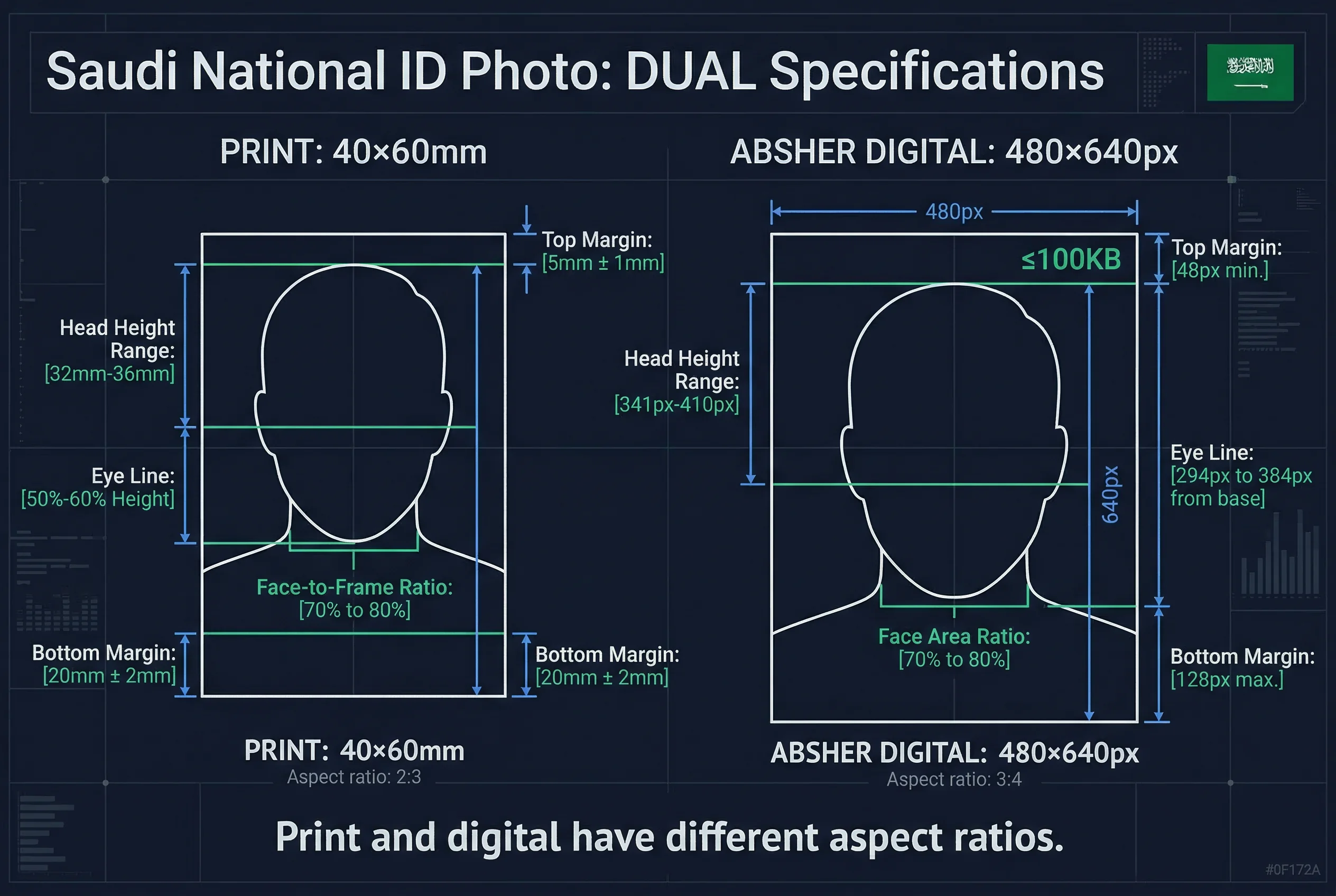
The Absher digital upload system was built with a different technical specification: 480 pixels wide by 640 pixels tall, which produces a 3:4 aspect ratio. The reason is digital display optimisation — 3:4 is a common ratio for digital identity systems and screen display, slightly squarer than the 2:3 print format.
The result is that a raw 40×60mm scan doesn't fit the Absher upload field without distortion. A 480×640px digital crop doesn't produce the correct dimensions for a 40×60mm print without cutting into the image. You need separate versions cropped to the correct aspect ratio for each use.
Get a compliant passport photo online
Preparing Both Saudi National ID Photo Versions
For the printed card (40×60mm / 2:3)
- Start with a photo taken against a plain white background, full face visible
- Crop to 472×709 pixels (or proportional equivalent at the correct ratio)
- White background, no glasses, neutral expression
- Same standard as the Saudi passport photo
For the Absher upload (480×640px / 3:4)
- Same source photo, different crop
- Crop to exactly 480×640 pixels
- File size must not exceed 100KB — save as JPEG at approximately 85% quality to stay within this limit
- Check that the full face remains visible in the 3:4 crop; the slightly squarer format means the top and bottom of the image are proportionally shorter than in the 2:3 version
The passportsize-photo.online checker can prepare compliant versions of both formats from a single source photo, so you don't have to manage the cropping manually.
Full Saudi National ID Photo Specifications
Physical Card Photo (40×60mm / 2:3 Ratio)
| Requirement | Specification |
|---|---|
| Print size | 40×60mm |
| Digital size | 472×709 pixels |
| Aspect ratio | 2:3 |
| Background | Plain white |
| Glasses | Not allowed |
| Expression | Neutral, mouth closed |
| Head size | Occupying 70–80% of frame |
Absher Digital Upload (480×640px / 3:4 Ratio)
| Requirement | Specification |
|---|---|
| Pixel dimensions | 480×640 pixels |
| Aspect ratio | 3:4 |
| File format | JPEG |
| Maximum file size | 100KB |
| Background | Plain white |
| Glasses | Not allowed |
| Expression | Neutral, mouth closed |
Applying for a Saudi National ID via Absher Portal
Absher (absher.sa) is the Saudi government's digital services portal, administered by the Ministry of Interior. The National ID renewal and update processes run through Absher. The portal is available in Arabic and English.
For initial ID issuance, Saudi nationals are enrolled in the NIC system at age 15. The first card is issued through NIC-registered offices. Renewals are handled online through Absher or at NIC service centres.
The Absher app (available on iOS and Android) allows most National ID transactions. When uploading a photo through the app, the system runs an automated compliance check — it will reject images that fail background, sizing, or expression requirements. Understanding the 480×640px specification before uploading avoids the round trip.
Steps for Absher photo upload
- Log in to absher.sa or the Absher app
- Navigate to Identity Services (خدمات الهوية)
- Select National ID Renewal (تجديد بطاقة الهوية)
- Upload your 480×640px JPEG photo (≤100KB)
- Complete the remaining application fields
- Pay the applicable fee
- Receive the updated card within the processing window
Important Notes on the Absher File Size Limit
100KB is a tight file size constraint for a 480×640 pixel image. A raw JPEG at that resolution typically runs 60–150KB depending on compression. To reliably stay under 100KB:
- Save as JPEG at 80–85% quality (not 100%)
- Do not use PNG — PNG files for this resolution will exceed 100KB
- Avoid unnecessary metadata embedded in the file
If the Absher upload rejects your photo for file size, it will show a specific error. Reduce compression quality slightly and retry.
Who Is the Saudi National ID Issued To?
The Saudi National ID (بطاقة الهوية الوطنية) is issued exclusively to Saudi nationals. Expatriate residents in the Kingdom receive an Iqama (إقامة — Residence Permit), which serves an equivalent identity function for non-nationals. If you're a Saudi expatriate worker, the Iqama photo requirements cover the separate specifications for that document.
Expression and Appearance Rules for Saudi NID Photos
- Neutral expression — mouth closed, no smile, no frown
- Eyes open — both eyes fully visible, looking directly at the camera
- No glasses — all types banned without exception, including clear prescription lenses
- Hair away from face — forehead and both eyes clearly visible
- Head coverings — women may wear hijab; men may wear ghitra/shemagh; full face from chin to forehead must remain visible in all cases
- Clean, even lighting — no shadows on face or background
- Recent photo — taken within the last 6 months
Saudi Document Photo Comparison
| Document | Size | Background | Glasses | Smile |
|---|---|---|---|---|
| National ID | 40×60mm | White | Not allowed | Not allowed |
| Saudi Passport | 40×60mm | White | Not allowed | Not allowed |
| Iqama | 40×60mm | White | Not allowed | Not allowed |
All three Saudi documents share the same 40×60mm specification. One compliant photo session covers every Saudi document application. Note the Absher digital upload has a different aspect ratio (480×640px / 3:4) — prepare separate digital and print versions.
Common Saudi National ID Photo Rejection Reasons
- Glasses present — even clear prescription lenses are rejected
- Non-white background — off-white, cream, or coloured backgrounds fail
- File too large for Absher — must be under 100KB JPEG
- Wrong aspect ratio — submitting a 2:3 crop to the 3:4 Absher upload field
- Shadows on background — uneven lighting creates grey patches
Quick Checklist for Saudi National ID Print Photos
- Size: 40×60mm
- Background: white
- Expression: neutral, mouth closed
- No glasses (any type)
- Photo taken within 6 months
Quick Checklist for Saudi National ID Absher Upload
- Dimensions: 480×640 pixels (3:4 ratio)
- File format: JPEG, under 100KB
- Background: white
- No glasses
- Separate crop from print version
For a full overview of Saudi Arabian identity documents, visit the Saudi Arabia documents page.