IDPhoto4You is free. passportsize-photo.online costs $4.99. On the surface, that makes IDPhoto4You the obvious winner. But free comes with trade-offs — watermarked output, no compliance verification, and a DIY approach that puts all the responsibility for getting it right on you.
Is saving $4.99 worth the risk of a rejected passport application? Here's the full comparison.
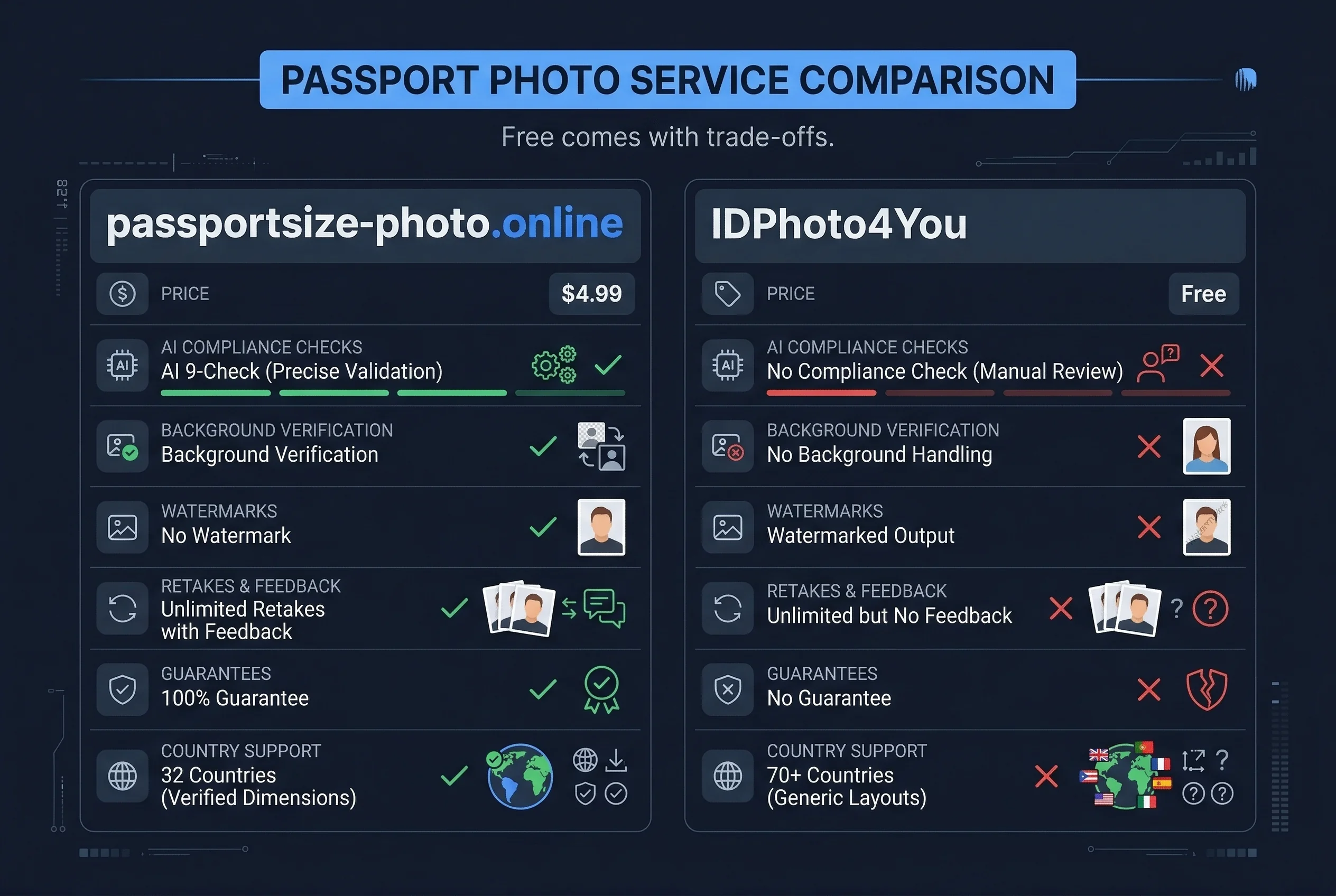
Passport Size Photo vs IDPhoto4You: Quick Comparison
| Feature | Passport Size Photo | IDPhoto4You |
|---|---|---|
| Price | $4.99 | Free (with watermark) |
| Compliance check | AI verification (9 checks) | None — manual cropping only |
| Background handling | Verifies your background | None — uses your original |
| Digital copy | Yes (high-res, no watermark) | Yes (watermarked unless you pay) |
| Physical prints | Self-print | Self-print (from watermarked file) |
| Retakes | Unlimited, free | Unlimited (but no compliance feedback) |
| Guarantee | 100% acceptance | None |
| Countries supported | 32 | 70+ |
Get a compliant passport photo online
How Passport Size Photo Runs AI Compliance Checks
Upload a photo taken against the appropriate background for your country. passportsize-photo.online runs automated checks against official government specifications: head-to-frame ratio, eye position, background uniformity, lighting balance, expression, resolution, and format.
Each check returns a pass or fail with specific feedback. Fix failed areas and reupload — no cost, no limit. Once all nine checks pass, download the verified file for $4.99. The output is print-ready and formatted to the exact pixel dimensions your country requires.
How IDPhoto4You Crops Your Passport Photo
IDPhoto4You is a web-based cropping tool. You upload a photo, select your country and document type, and the tool overlays a template showing where your head should be positioned. You manually adjust the crop until the photo fits within the guidelines.
The tool then generates a print-ready file — typically a 4×6 inch sheet with multiple passport-sized photos arranged for home printing. The free version includes a watermark across the output. To remove the watermark, you pay a small fee (the amount varies).
That's the full extent of what IDPhoto4You does. It does not check your background colour. It does not measure head-to-frame ratios. It does not verify eye position, lighting, or expression. It's a crop-and-template tool — useful, but not a compliance tool.
Key Differences: Compliance Checking vs Manual Cropping
What Does IDPhoto4You's Free Tier Actually Include?
IDPhoto4You's free tier gives you a watermarked output file. The watermark is visible on the printed photo, which means the free version is essentially a preview — usable for checking your crop, not for actual passport submission.
To get an unwatermarked file, you pay a small fee. The exact price varies by country and is typically a few dollars. By the time you remove the watermark, the cost gap with passportsize-photo.online narrows significantly.
Even without the watermark, you're getting a cropped photo with no compliance verification. You're trusting that your original photo meets all requirements — background, lighting, head size, eye position — based on your own judgment.
Compliance Verification vs Manual Cropping
This is the core difference and it's not subtle.
IDPhoto4You helps you crop your photo to the right dimensions. It provides a visual overlay so you can see approximately where your head should fall in the frame. Beyond that, you're on your own. Did you use the right background colour? IDPhoto4You doesn't check. Is your head between 50% and 69% of the frame height? You're eyeballing it. Are there shadows on your face? No detection. Is the lighting even? No analysis.
passportsize-photo.online measures each parameter against exact government values. Head height isn't "approximately right" — it's calculated as a percentage and compared to the allowable range. Background isn't "looks white" — it's analysed for colour values and uniformity. Eye position isn't "seems centred" — it's measured from the bottom of the frame and compared to the published requirement.
The difference is the difference between "this looks about right" and "this meets the specification." For a document that can be rejected for being off by a few percentage points, precision matters.
Passport Photo Output Quality Compared
IDPhoto4You's output quality is limited by what you give it. Upload a great photo and you get a great crop. Upload a mediocre photo — slightly wrong background, uneven lighting, head tilted 3 degrees — and you get a perfectly cropped mediocre photo. The tool doesn't improve your image or flag problems.
passportsize-photo.online also doesn't modify your photo (no background replacement, no filters). But it tells you when something is wrong before you commit. The feedback loop — upload, check, fix, reupload — means you converge toward a compliant result through iteration. IDPhoto4You doesn't have this loop; you crop and hope.
Country Coverage for Passport Photo Tools
IDPhoto4You supports about 70 countries and document types. passportsize-photo.online supports 32 countries with deeply verified specifications. If your country is in passportsize-photo.online's list, you get detailed compliance data. If not, IDPhoto4You's broader (but shallower) coverage may be useful for getting dimensions right — though without any compliance guarantee.
Self-Print Workflow for Passport Photos
Both tools assume you'll print the photo yourself. The workflow is similar: download the file, print on glossy photo paper at home, or take the file to a pharmacy photo kiosk.
IDPhoto4You generates a 4×6 layout with multiple passport photos arranged for efficient printing. passportsize-photo.online provides the individual photo file at the correct dimensions — you can arrange it into a 4×6 layout yourself or print individual copies.
For home printing, both approaches work. IDPhoto4You's pre-arranged layout saves a small step. passportsize-photo.online's individual file gives you more flexibility.
Acceptance Guarantees for Passport Photos
IDPhoto4You offers no acceptance guarantee. If your photo is rejected, there's no refund and no recourse. Given that the tool doesn't perform compliance checking, a guarantee would be hard to justify anyway.
passportsize-photo.online guarantees acceptance. If your application is rejected due to the photo, you receive a full refund. The guarantee is backed by the compliance verification — the tool doesn't guarantee photos it hasn't verified.
When to Choose IDPhoto4You for Passport Photos
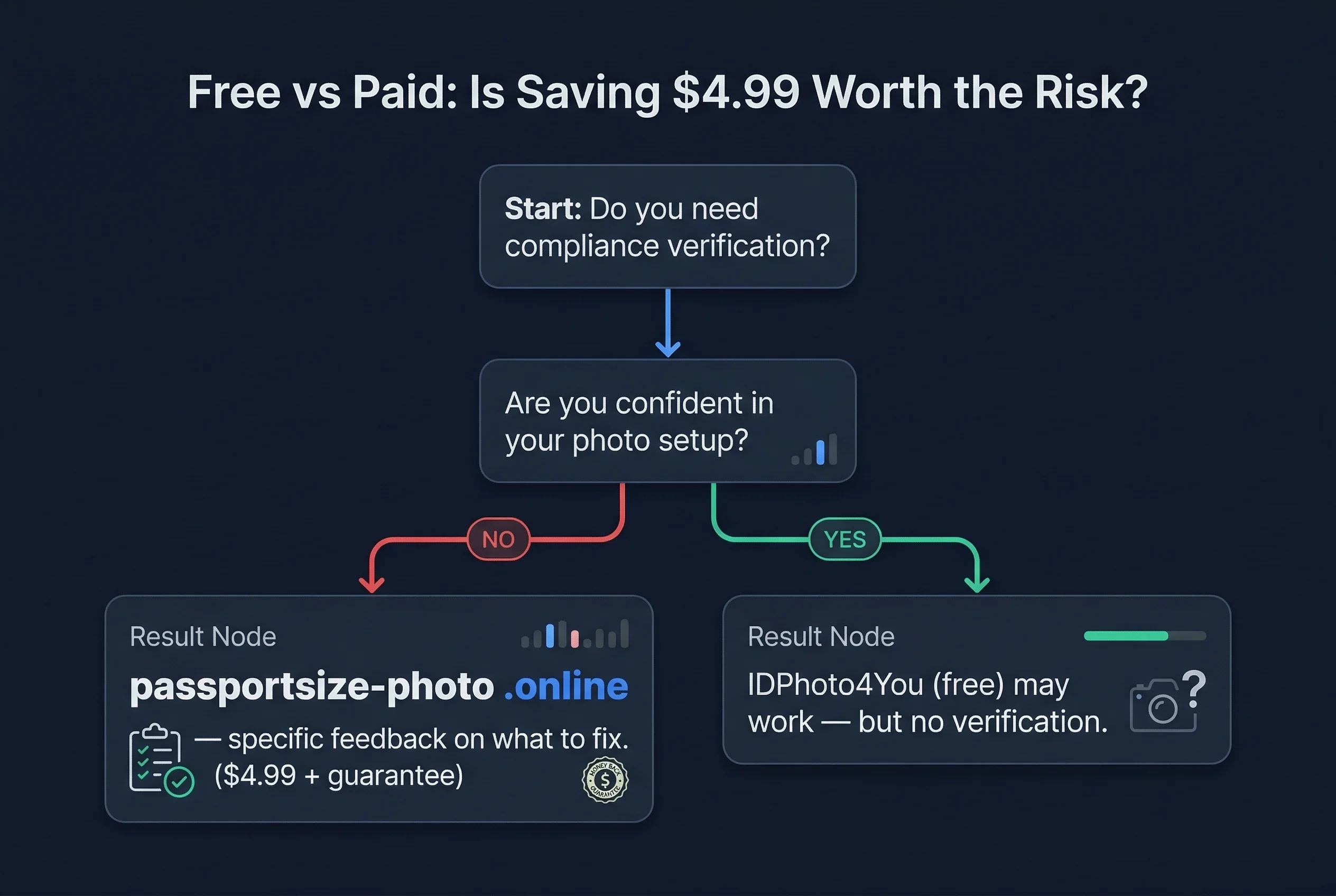
- You're confident your original photo already meets all requirements
- You just need a cropping tool to get the dimensions right
- You don't want to spend any money (and are okay with the watermark)
- Your country isn't in passportsize-photo.online's supported list
IDPhoto4You works best for people who already know what a compliant passport photo looks like and just need help with the mechanical step of cropping to size. Photographers, frequent travellers who've done this many times, or anyone who's studied the requirements carefully can use it effectively.
When to Choose Passport Size Photo Over IDPhoto4You
- You want verification that your photo actually meets the spec
- You've never taken a passport photo before and don't know the rules
- You want a guarantee against rejection
- You've had a passport photo rejected in the past
- Your country is in the supported list of 32
passportsize-photo.online is for anyone who wants the compliance question answered before they submit. The $4.99 isn't paying for a crop — it's paying for certainty.
Passport Size Photo vs IDPhoto4You: Our Verdict
IDPhoto4You is a useful free tool for cropping photos to passport dimensions. That's genuinely valuable. But it's not a compliance tool, and treating it as one is risky. The crop can be perfect while the background, lighting, or head position is wrong — and IDPhoto4You won't tell you.
passportsize-photo.online costs $4.99 and answers the question that actually matters: will this photo be accepted? For a document you need to get right — one where rejection means weeks of delay — $4.99 for verified compliance is the better investment.
Try it now: upload your photo to passportsize-photo.online for instant verification. Check US passport photo requirements, browse all supported countries, or read our roundup of the best online passport photo services for a broader view.